
Ladder against the wall: Pythagorean theorem dynamic demo
Loading the math board and drawing, please wait…
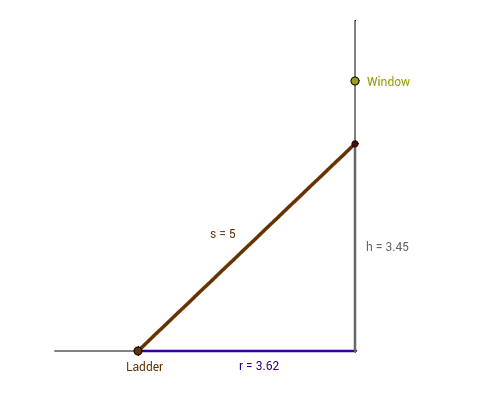
① This example demonstrates the Pythagorean theorem through a ladder leaning against a wall, visually showing the relationship between the squares of the two legs and the hypotenuse in a right triangle. ② Core mathematical concepts include the Pythagorean theorem, right triangles, vectors, perpendicular lines, and continuous variation. ③ Construction highlights: using GeoGebra commands such as Segment, Point, OrthogonalLine, and UnitVector, with objects like A, B, a, Ladder, r, b, u, resi, O, d, Window, leiter, F, h, and s to build an interactive model where the ladder's position can be adjusted. ④ Suitable for middle school to high school students learning the Pythagorean theorem, and for teachers to demonstrate or students to explore the geometric and algebraic connections between side lengths.
GeoGebra Commands & Parameters
Segment(A, B) → aPoint(a) → LadderSegment(Ladder, B) → rOrthogonalLine(B, a) → bUnitVector(b) → uSegment(B, O) → dSegment(B, F) → hSegment(Ladder, F) → s
AI Drawing Prompt Reference
Draw a dynamic demonstration of a ladder leaning against a wall to illustrate the Pythagorean theorem. The ladder, ground, and wall form a right triangle. Adjust the ladder's position to visually show that the square of the hypotenuse equals the sum of the squares of the other two sides. Include the ladder, ground, and wall, with perpendicular lines from the ladder's top to the wall and ground, a slider to control the ladder's position, and display related lengths and vectors.
The prompt above was compiled from the original drawing commands and is for reference only.