
Kite by Giio Santiago
Loading the math board and drawing, please wait…
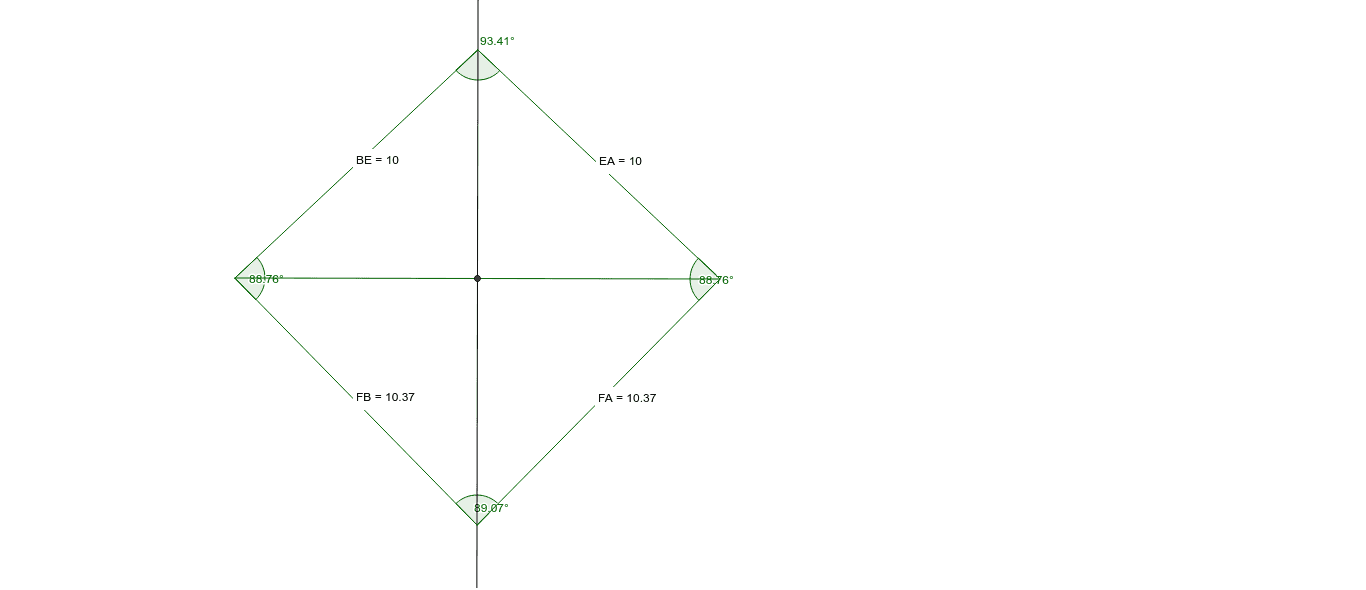
This example demonstrates the construction of a kite, a special type of quadrilateral where the diagonals are perpendicular and bisect each other. Using GeoGebra commands such as Segment, Midpoint, and OrthogonalLine, an accurate kite can be constructed. This example is suitable for middle school and above students to learn geometric construction and related properties.
GeoGebra Commands & Parameters
Segment(A, B) → aMidpoint(a) → COrthogonalLine(C, a) → bPoint(b) → EPoint(b) → FSegment(B, E) → cSegment(E, A) → dSegment(F, B) → eSegment(F, A) → fAngle(F, B, E) → αAngle(A, F, B) → βAngle(B, E, A) → γAngle(E, A, F) → δDistance(F, B) → distanceFBDistance(B, E) → distanceBEDistance(E, A) → distanceEADistance(F, A) → distanceFA
AI Drawing Prompt Reference
Draw a kite ABFE where the diagonals are perpendicular and bisect each other. Start by drawing segment AB, then find the midpoint C of AB and draw a line b perpendicular to AB, which intersects AB at points E and F. Next, connect points B and E, E and A, F and B, and F and A to form the kite ABFE. Finally, measure and record the angles ∠FBE, ∠ABF, ∠BEA, and ∠EAF, as well as the lengths of BF, BE, EA, and FA.
The prompt above was compiled from the original drawing commands and is for reference only.