
Kite Area Formula Demonstration
Loading the math board and drawing, please wait…
In collections
Deriving area formulas for Geometry
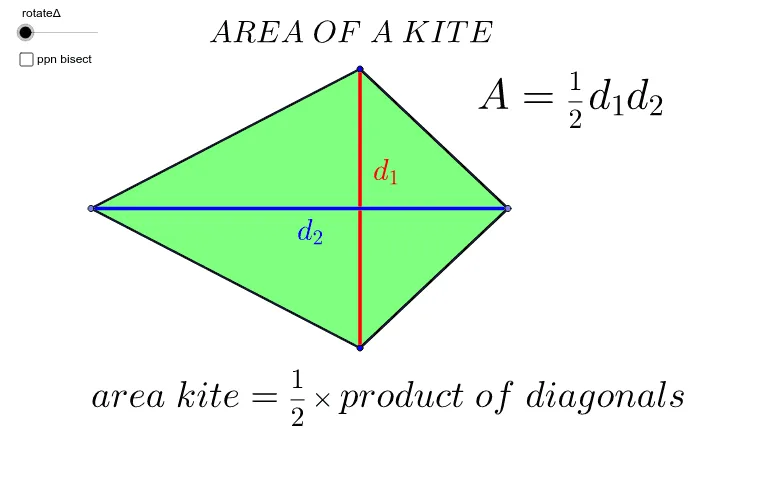
This example dynamically demonstrates the derivation of the kite area formula. It involves core math concepts like kite diagonals, right triangles, trigonometry, similar triangles, and coordinate geometry. GeoGebra commands and objects used include Segment, LineBisector, Point, Intersect, Polygon, Midpoint, Rotate, and Angle. Suitable for high school mathematics instruction to visually explain the geometric meaning and application of the kite area formula.
GeoGebra Commands & Parameters
Segment(A, B) → ABLineBisector(AB) → bPoint(b) → CPoint(b) → DSegment(C, A) → cSegment(D, A) → dSegment(B, D) → eSegment(C, B) → fIntersect(b, AB) → EPolygon(C, E, A) → poly1, a_1, c_1, e_1Polygon(C, E, B) → poly2, b_1, c_2, e_2Polygon(A, E, D) → poly3, d_4, a_2, e_3Polygon(E, B, D) → poly4, d_3, e_4, b_2Midpoint(C, A) → FMidpoint(C, B) → GMidpoint(A, D) → HMidpoint(D, B) → IRotate(A, rotateΔ, H) → A'Rotate(E, rotateΔ, H) → E'Rotate(D, rotateΔ, H) → D'Polygon(A', E', D') → poly3', d', a', e'Rotate(C, rotateΔ, F) → C'Rotate(E, rotateΔ, F) → E'_1Rotate(A, rotateΔ, F) → A'_1Polygon(C', E'_1, A'_1) → poly1', a'_1, c', e'_1Rotate(C, rotateΔ, G) → C'_1Rotate(E, rotateΔ, G) → E'_2Rotate(B, rotateΔ, G) → B'Polygon(C'_1, E'_2, B') → poly2', b', c'_1, e'_2Rotate(E, rotateΔ, I) → E'_3Rotate(B, rotateΔ, I) → B'_1Rotate(D, rotateΔ, I) → D'_1Polygon(E'_3, B'_1, D'_1) → poly4', d'_1, e'_3, b'_1Segment(D, C) → CDMidpoint(A, E) → JMidpoint(D, C) → KAngle(C, E, A) → αMidpoint(E, B) → LSegment(A, E) → aSegment(E, B) → gSegment(C, E) → iSegment(D, E) → jPolygon(D, C, A) → poly5, a_3, d_5, c_3Polygon(D, C, B) → poly6, b_3, d_6, c_4
AI Drawing Prompt Reference
Draw a kite and demonstrate the derivation of its area formula. Start by drawing the two diagonals of the kite and finding their intersection point. Then connect the endpoints of the diagonals to form four right triangles with the intersection point as one vertex. Next, rotate these triangles to rearrange them into a rectangle, labeling its length and width as the lengths of the kite's diagonals. Finally, calculate the area of the rectangle to derive the kite's area formula.
The prompt above was compiled from the original drawing commands and is for reference only.