
Kite Area Demonstration by Craig Mackey
Loading the math board and drawing, please wait…
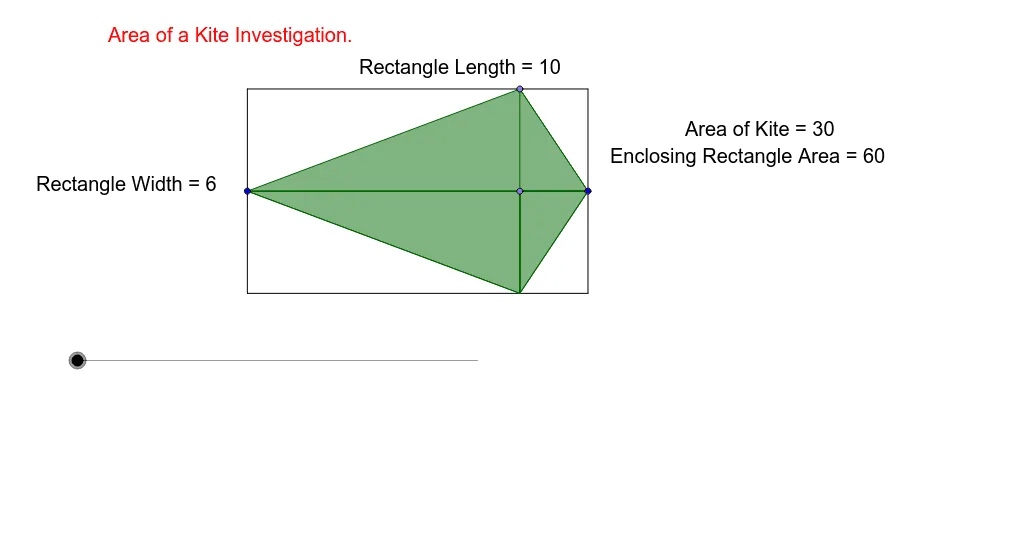
This example demonstrates how to dynamically calculate the area of a kite by exploring its properties and the area formula. Key math concepts include kite diagonals, area calculation, and coordinate geometry construction. GeoGebra commands and objects used are Line, Point, OrthogonalLine, Segment, Midpoint, Mirror, Vector, Polygon, Intersect, Translate. Suitable for high school mathematics teaching to visually understand the derivation of the kite area formula.
GeoGebra Commands & Parameters
Line(A, B) → aPoint(a) → COrthogonalLine(C, a) → bPoint(b) → DSegment(B, D) → pMidpoint(p) → EMirror(D, a) → D'Segment(D', B) → nMidpoint(n) → JVector(J, E) → uPolygon(A, D, B, D') → poly1, a_1, d, b_1, d'OrthogonalLine(B, a) → cOrthogonalLine(D, b) → eOrthogonalLine(A, a) → fOrthogonalLine(D', b) → gIntersect(f, g) → FIntersect(c, g) → GIntersect(c, e) → HIntersect(e, f) → ISegment(D, D') → iSegment(F, G) → jSegment(G, H) → kSegment(H, I) → lSegment(I, F) → mSegment(A, B) → hPolygon(D', C, B) → poly2, b_2, d'_1, c_1Midpoint(n) → RTranslate(R, Vector[o * u]) → R'Line(J, m) → rSegment(C, B) → sMidpoint(s) → SVector(C, B) → vTranslate(C, Vector[o * (u + v)]) → C'Translate(B, Vector[o * (u - v)]) → B'Vector(D', B) → wTranslate(D', Vector[o * w]) → D''Polygon(D'', C', B') → poly3, b', d'', c'Vector(D', A) → zVector(A, I) → qVector(C, A) → tTranslate(D', Vector[o * z]) → D''_1Translate(C, Vector[o * (t + q)]) → C'_1Translate(A, Vector[o * (q - t)]) → A'Polygon(D''_1, C'_1, A') → poly4, a', d''_1, c'_1Polygon(A, B, D) → poly5, d_1, a_2, b_3Polygon(D', B, C) → poly6, c_2, d'_2, b_4Polygon(D', C, A) → poly7, a_3, d'_3, c_3
AI Drawing Prompt Reference
Draw a kite and demonstrate its area calculation using its diagonals. Start by creating line segments AB and CD, then find their midpoints E and J. Next, use reflections and rotations to create D' and C', and construct new polygons with them. Finally, adjust the positions of the points to ensure the area can be calculated using the diagonals.
The prompt above was compiled from the original drawing commands and is for reference only.