
Jitterbug Origami Model Animation: Dynamic Transformation from Octahedron to Ico
Loading the math board and drawing, please wait…
In collections
Action Modular Origami
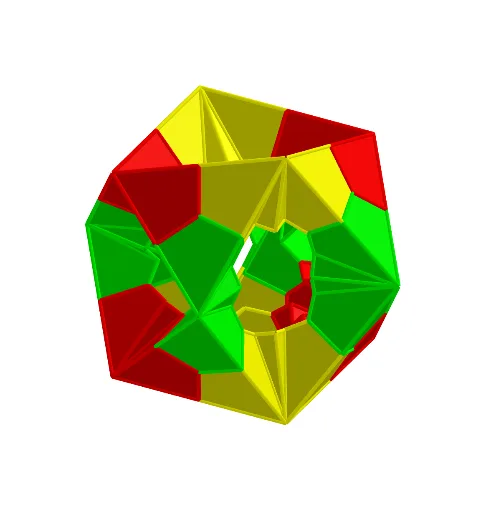
This example demonstrates an animation of a paper-folding model called 'Jitterbug', based on the book 'Action Modular Origami'. It visualizes the dynamic transformation between polyhedra, particularly the transition from an octahedron to an icosahedron through folding and rotation. The core mathematical concepts include solid geometry, polyhedra (octahedron, icosahedron, cube), centroids, planes, and geometric transformations such as rotation, dilation, and reflection. The construction uses GeoGebra commands like Point, Intersect, Octahedron, Centroid, Line, Dilate, Rotate, Icosahedron, Plane, Cube, LineBisector, Mirror, Conic, Polygon, Midpoint, AngularBisector, Circle, Segment, Translate, Sequence, and OrthogonalLine, creating multiple faces (e.g., faceABC, faceACF) and edges (e.g., edgeAC, edgeBC) to form the animated structure. This example is suitable for high school or early college students to explore polyhedral geometry, spatial transformations, and dynamic visualization, and can serve as an engaging resource for origami mathematics and STEAM education.
GeoGebra Commands & Parameters
Point(yAxis) → AIntersect(yAxis, zAxis) → OOPoint(zAxis) → CPoint(xAxis) → BOctahedron(C, B, A) → a, D, faceAEF, faceDEF, edgeAC, edgeBC, edgeAB, edgeCF, edgeAF, edgeCD, edgeDF, edgeBD, E, edgeBE, edgeDE, edgeAE, edgeEF, F, faceABC, faceACF, faceCDF, faceBCD, faceBDE, faceABECentroid(faceABC) → GLine(OO, G) → fDilate(A, (sqrt(5) - 1) / 2, B) → A'Rotate(A', (-(120°)), f) → A''_1Rotate(A', 120°, f) → A''Icosahedron(A''_1, A'', A') → b, H, face1, face2, face5, face4, face3, faceA''HL, faceA''IL, faceA'A''I, faceA'IM, faceA'JM, I, faceILO, faceIMO, faceMOP, faceJMP, faceLNO, faceNOP, faceKNP, faceJKP, faceHLN, faceHKN, J, edge1, edge2, edgeA'A'', edge4, edgeA'J, edge5, edgeJK, edge3, edgeHK, edgeA''H, K, edgeA''L, edgeHL, edgeA''I, edgeIL, edgeA'I, edgeA'M, edgeIM, edgeJM, edgeIO, edgeLO, L, edgeMO, edgeMP, edgeOP, edgeJP, edgeNO, edgeLN, edgeNP, edgeKP, edgeKN, edgeHN, M, N, O, PPoint(Circle[Q, Distance[T, Q], Segment[T, Q]]) → UPlane(U, A, C) → dCube(T, Q, U) → c, V, face8, face9, edgeTV, edgeQT, edgeQU, edgeUV, edgeTW, edge7, edge8, edgeWZ, W, edgeQZ, edge9, edge6, edge10, Z, A_1, B_1, faceQTVU, face7, faceQTWZ, face6LineBisector(A_1, R, d) → mRotate(m, (-ang), OO, d) → m'Mirror(A''_1, m) → H_1Conic(S, A''_1, B_1, H_1, V) → eIntersect(m', e) → G_1, I_1Rotate(C_1, 120°, f) → D_1Rotate(C_1, (-(120°)), f) → E_1Polygon(C_1, E_1, D_1) → t3, d_1, c_1, e_1Midpoint(c_1) → L_1Plane(C_1, L_1, U) → oIntersect(f, t3) → F_1Midpoint(e_1) → K_1Midpoint(d_1) → J_1Polygon(C_1, K_1, F_1, J_1) → q1, c_2, k_1, f_1, j_1Line(I_1, E_1) → l_1Mirror(F_1, l_1) → S_1Mirror(K_1, l_1) → Q_1AngularBisector(S_1, I_1, Q_1) → n_1Line(Q_1, S_1) → q_1Intersect(n_1, q_1) → T_1Polygon(I_1, J_1, S_1, T_1) → q3, i_2, j_3, s_1, t_1Rotate(T_1, (-ang2), l_1) → Z_1Mirror(Z_1, o) → D_2Mirror(D_2, d) → G_2Plane(G_2, D_2, C_1) → wMirror(Z_1, d) → B_2Plane(Z_1, C_1, B_2) → uRotate(q3, (-ang2), l_1) → q3'Mirror(q3', o) → q3''Rotate(Q_1, (-ang2), l_1) → V_1Mirror(V_1, w) → J_2Plane(V_1, J_2, D_2) → a_1Circle(D_2, V_1, a_1) → e_2Intersect(d, e_2) → M_2, N_2Polygon(C_1, N_2, D_2) → t10, d_3, c_8, n_2Mirror(V_1, u) → C_2Polygon(Z_1, C_2, C_1) → t7, c_3, z_1, c_4Polygon(C_1, C_2, B_2) → t8, b_3, c_5, c_6Rotate(I_1, (-ang2), l_1) → U_1Segment(U_1, V_1) → r_1Rotate(C_2, (-(180°)), r_1) → H_2Polygon(H_2, D_2, C_1) → t9, c_7, h_2, d_2Mirror(C_2, o) → E_2Mirror(B_2, o) → F_2Mirror(t7, d) → t7'Polygon(Q, R, S) → t1, s, q, rPolygon(B_1, T, Z) → t2, g, h, iPointIn(face1) → Pointface1PointIn(t2) → Pointt2Plane(B, U, C) → jPointIn(t3) → Pointt3Mirror(t3, d) → t3'Mirror(t3', j) → t3''Translate({t7, t8, t10, q1, q3', q3'', Mirror[{q1, q3', q3'', t10}, d]}, Vector[A, A]) → list1Mirror(t3, j) → t3'_1Mirror(t3', xOyPlane) → t3''_1Mirror(t3'_1, xOyPlane) → t4Mirror(t3, xOyPlane) → t3'_2Mirror(t3'', xOyPlane) → t3'''AngularBisector(yAxis, xAxis) → k, lSequence(Rotate[list1, (ii * 180°), zAxis], ii, 0, 1, 1) → list1'Sequence(Rotate[list1', (ii * 180°), yAxis], ii, 0, 1, 1) → L_2Rotate(L_2, 120°, f) → L_3Rotate(L_2, (-(120°)), f) → L_4Mirror(q1, i) → q1'OrthogonalLine(B_1, g, q1) → nMirror(J_1, n) → M_1Mirror(F_1, n) → N_1Line(M_1, B_1) → pAngularBisector(p, n) → t, g_1OrthogonalLine(M_1, p, q1) → h_1OrthogonalLine(J_1, i, q1) → i_1Intersect(n, h_1) → O_1Intersect(h_1, t) → P_1Polygon(B_1, J_1, O_1, P_1) → q2, b_1, j_2, o_1, p_1Polygon(B_1, P_1, M_1) → t5, m_1, b_2, p_2Mirror(K_1, l_1) → R_1Mirror(q1, l_1) → q1'_1Polygon(I_1, Q_1, T_1) → t6, t_2, i_3, q_2Rotate(t6, (-ang2), l_1) → t6'Rotate(S_1, (-ang2), l_1) → W_1Mirror(W_1, d) → A_2Mirror(F_1, d) → I_2Mirror(q1, d) → q1'_2Mirror(t6', o) → t6''Plane(I_2, C_1, F_1) → vLine(J_2, D_2) → f_2Mirror(V_1, f_2) → K_2
AI Drawing Prompt Reference
Create an animated origami model showing a dynamic transformation from an octahedron to an icosahedron. Start with an octahedron whose vertices lie on the coordinate axes, and mark the centroid of one face. Use a line through the origin and this centroid as an axis, then scale one vertex by the golden ratio and rotate it around the axis to generate vertices of an icosahedron, which is then constructed. Add a cube with one face coplanar with a face of the octahedron. Using angle bisectors, reflections, and rotations, construct foldable triangular panels on the cube that rotate around edges to simulate paper folding. The scene includes multiple polyhedra, auxiliary planes, circles, and segments, with sliders controlling rotation angles for the animation.
The prompt above was compiled from the original drawing commands and is for reference only.