
Iterate a Fractal Tree with a New Tool (Step 3)
Loading the math board and drawing, please wait…
In collections
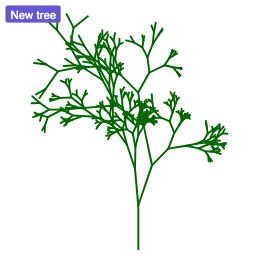
How to make fractal trees using randomness?
This example demonstrates how to generate a fractal tree shape by iteratively applying geometric transformations. It highlights the idea of iteration (recursion-style construction) to produce self-similar branching, and the role of dilation (scaling) in controlling branch proportions. The construction uses Segment to create branch segments and Point to define key nodes. Dilate is then used to create scaled copies of branches relative to a chosen reference. IterationList generates the sequence of repeatedly transformed elements, while button1/button2 control the iteration steps. Intermediate results are collected via ListOutPut and all generated objects can be managed through ListAll. Suitable for advanced secondary students and early university learners interested in dynamic geometry, transformation-based modeling, and introductory fractal visualization.
GeoGebra Commands & Parameters
Segment((0, 0), (0, 2)) → fPoint(f, 0) → APoint(f, 1) → BDilate(Rotate[A, pi + (random() * pi / 4), B], 0.5 + (0.5 * random()), B) → CDilate(Rotate[A, pi - (random() * pi / 4), B], 0.5 + (0.5 * random()), B) → DDilate(Rotate[A, pi + pi / 8 + (random() * pi / 4), B], 0.5 + (0.5 * random()), B) → EIterationList(Flatten[Zip[Grow[s], s, level]], level, {{f}}, 8) → ListAll
AI Drawing Prompt Reference
Draw a fractal tree shape generated by iteration. Start with a vertical line segment, and from a point on it, create branches by rotating and scaling. Each iteration adds new branches with decreasing proportions. Ensure the shape has self-similarity and maintains continuity.
The prompt above was compiled from the original drawing commands and is for reference only.