
Isosceles Trapezoid Template (Scaffolded Discovery)
Loading the math board and drawing, please wait…
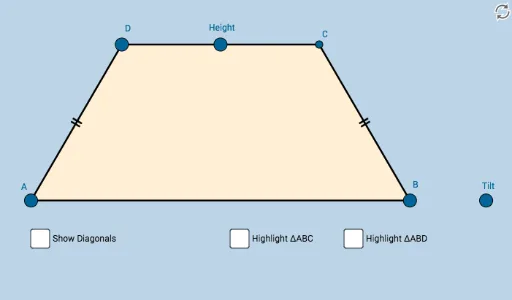
This example demonstrates the geometric properties and dynamic variations of an isosceles trapezoid. It involves core mathematical concepts such as polygons, line segments, midpoints, symmetry, rotation, and reflection. The construction utilizes GeoGebra commands and objects like Line, Ray, Point, Midpoint, Slope, OrthogonalLine, Mirror, Dilate, Segment, Circle, Intersect, Vector, Translate, Angle, Rotate, Polygon, and Distance. It is suitable for high school mathematics education, exploring the symmetry, angle relationships, and connections with other shapes like kites and circles.
GeoGebra Commands & Parameters
Line(A, B_1) → aRay(A, B_1) → bPoint(b) → BMidpoint(A, B) → D_1Line(A, B) → cSlope(c) → dOrthogonalLine(D_1, c) → gPoint(g) → E_1Ray(D_1, E_1) → hPoint(h) → FSlope(h) → iLine(F, c) → lPoint(l) → GPoint(l) → HRay(F, G) → mRay(F, H) → nPoint(m) → DMirror(D, h) → I'Dilate(A, If[0 < o ≤ 1, 1 - o, 0], B) → A'Segment(A, A') → pDilate(A, If[1 < o ≤ 2, 2 - o, 0], D) → A'_1Segment(A, A'_1) → qSegment(A, B) → rSegment(B, I') → sSegment(I', D) → tSegment(D, A) → a_1Circle(A, (0.2 * Min[a_1, r])) → c_1Circle(D, (0.2 * Min[a_1, r])) → d_1Intersect(d_1, a_1, 1) → JIntersect(d_1, t, 1) → KIntersect(c_1, r, 1) → LIntersect(c_1, a_1, 1) → MDilate(D, If[2 < o ≤ 3, 3 - o, 0], I') → I'_1Segment(D, I'_1) → b_1Dilate(A, If[3 < o ≤ 4, 4 - o, 0], B) → A'_2Vector(A, A'_2) → uTranslate(A, u) → A'_3Translate(A'_1, u) → NSegment(A'_3, N) → q'OrthogonalLine(A, r) → g_1Point(g_1) → OAngle(D, A, O) → αAngle(I', B, A) → βRotate(A'_3, If[4 < o ≤ 5, (((o - 4) * 2) * α), (2 * α)], B) → PRotate(N, If[4 < o ≤ 5, (((o - 4) * 2) * α), (2 * α)], B) → CSegment(P, C) → q''Dilate(A, If[5 < o ≤ 6, 6 - o, 0], B) → A'_4Vector(A, A'_4) → vDilate(D, If[7 < o ≤ 8, 8 - o, 0], I') → I'_2Vector(D, I'_2) → wDilate(A, If[9 < o ≤ 10, 10 - o, 0], I') → A'_5Segment(A, A'_5) → i_1Dilate(A, If[10 < o ≤ 11, 11 - o, 0], D) → A'_6Vector(A, A'_6) → u_1Translate(A, u_1) → A'_7Translate(A'_5, u_1) → QSegment(A'_7, Q) → j_1Segment(D, B) → l_1Angle(L, A, I') → γRotate(A'_7, If[11 < o ≤ 12, ((-(o - 11)) * (2 * γ)), (-2 * γ)], D) → RRotate(Q, If[11 < o ≤ 12, ((-(o - 11)) * (2 * γ)), (-2 * γ)], D) → Q'Segment(R, Q') → m_1Polygon(A, B, I', D) → poly1, a_2, c_2, i', i_2Intersect(i_1, m_1) → EDistance(A, E) → distanceASDistance(E, C) → distanceSN'Distance(E, B) → distanceSCDistance(E, D) → distanceSIAngle(B, A, E) → δAngle(E, B, A) → εAngle(C, B, E) → ζAngle(E, A, D) → ηAngle(A, D, E) → θAngle(E, D, C) → ιAngle(D, C, E) → κAngle(B, E, C) → λAngle(E, C, B) → μAngle(A, E, B) → νPolygon(A, B, C) → poly2, c_3, a_3, b_2Segment(A, C) → h_1Mirror(A, h_1) → A'_8Mirror(B, h_1) → B'Mirror(C, h_1) → C'Polygon(A'_8, B', C') → poly2', c', a'_8, b'Polygon(D, A, B) → poly3, b_3, d_2, a_4Segment(D, B) → p_1Mirror(D, p_1) → D'Mirror(A, p_1) → A'_9Mirror(B, p_1) → B'_1Polygon(D', A'_9, B'_1) → poly3', b'_1, d', a'_9
AI Drawing Prompt Reference
Draw an isosceles trapezoid. Start with a horizontal base line and a ray from one endpoint; pick a point on the ray as the other base endpoint. Find the midpoint of the base and draw a perpendicular line as the axis of symmetry. Pick a point on this axis and draw a ray from the midpoint through it; choose a point on this ray to set the height. Through that point, draw a line parallel to the base. Pick two points on this parallel line, and from one of them draw a ray; choose a point on this ray as one top vertex. Reflect this vertex across the symmetry axis to get the other top vertex. Connect the four vertices to form the trapezoid. Mark small circles near the midpoints of the sides and their intersections with the sides to show angle relationships. Finally, apply translations and rotations to create auxiliary shapes that demonstrate symmetry and angle properties.
The prompt above was compiled from the original drawing commands and is for reference only.