
Isoperimetric Theorem
Loading the math board and drawing, please wait…
In collections
geometriadinamica.es
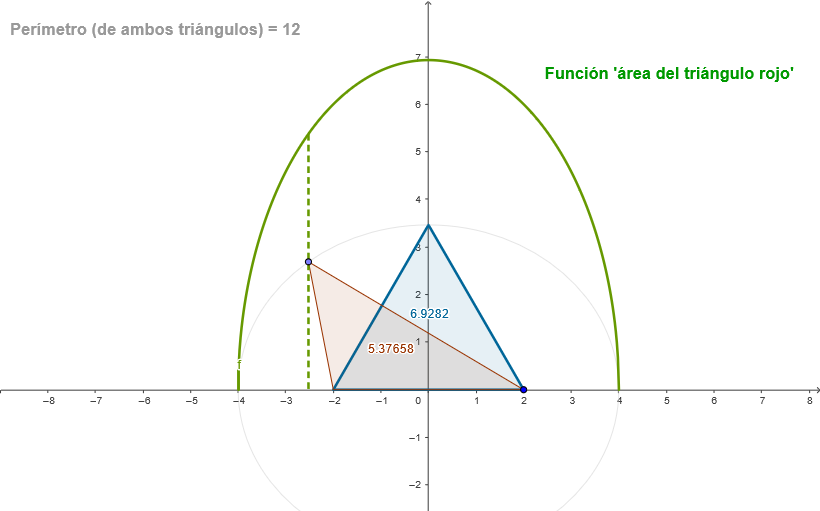
This example demonstrates the relationship between the boundary and area of an equilateral triangle. It involves the core mathematical concepts of equilateral triangle properties and area calculation. The construction points include using GeoGebra commands to create an equilateral triangle, calculate area and boundary length. It is suitable for middle school mathematics education, particularly for teaching geometry and measurement.
GeoGebra Commands & Parameters
Point(xAxis) → JRay(O, J) → iPoint(i) → BMirror(B, O) → APolygon(A, B, n) → poly1, a1, b1, b3, CSegment(A, B) → aEllipse(A, B, a) → kPoint(k) → DPolygon(A, D, B) → poly2, b2, a2, c2Ellipse((((-a)) / 2, 0), (a / 2, 0), a) → dMidpoint(A, B) → EAngle(B, E, D) → αRotate(F, α, O) → F'Line(O, F') → eIntersect(d, e, 2) → GOrthogonalLine(G, xAxis) → gIntersect(f, g, (-2.522724925337565, 5.376576685330704)) → HSegment(H, I) → h
AI Drawing Prompt Reference
Draw an equilateral triangle and calculate its area and perimeter. The triangle has three equal sides, and the area can be computed using the formula. The perimeter is the sum of the three sides. Make sure the shape is clear and label key points like vertices and midpoints.
The prompt above was compiled from the original drawing commands and is for reference only.