
Isometric View and Planar Graph
Loading the math board and drawing, please wait…
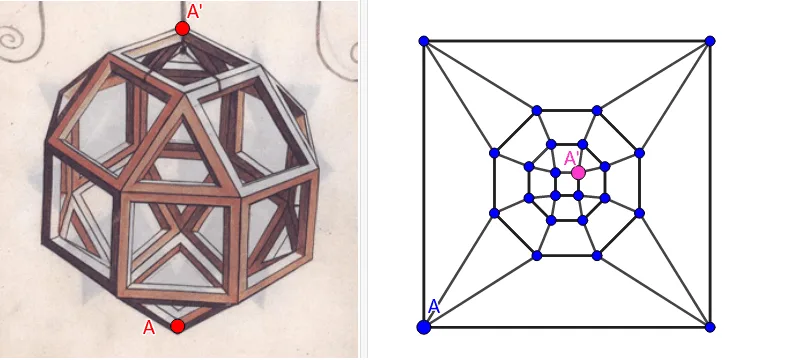
This example demonstrates isometric views and planar graphs. Using various GeoGebra commands such as Circle, Intersect, Rotate, Polygon, etc., it constructs isometric views and planar graphs. This involves knowledge of solid geometry and coordinate geometry. Suitable for high school mathematics education and learning.
GeoGebra Commands & Parameters
Circle(OO, 1, xOyPlane) → cIntersect(yAxis, c, 2) → ARotate(A, 45°) → BPolygon(A, B, 8, xOyPlane) → veelhoek1, zijde, D, E, F, G, H, g, h, i, j, k, l, m, CPolygon(B, A, 4, xOyPlane) → veelhoek2, f, n, p, q, I, JPolygon(D, C, 4, xOyPlane) → veelhoek3, r, s, t, a, K, LCircle(r, K) → dCircle(f, J) → eIntersect(d, e) → M, N, ,Angle(J, B, N) → αRotate(veelhoek2, -135°, zijde) → schuinLine(OO, OOO) → asLineBisector(A, B, xOyPlane) → bCircle(OO, zijde / 2, xOyPlane) → c_1Intersect(b, c_1) → O, POrthogonalLine(O, b, xOyPlane) → f_1Intersect(zijde, f) → QIntersect(b, zijde) → RVector(R, P) → uTranslate(veelhoek2, u) → veelhoek2'Translate(veelhoek2', Vector[(0, 0, z(N))]) → bovenTranslate(veelhoek2', Vector[(0, 0, (-z(N)) - zijde)]) → veelhoek2''Rotate(veelhoek2, 90°, zijde) → rechtSequence(Rotate[schuin, ((n * 90))°, as], n, 0, 3) → lijst_1Sequence(Rotate[recht, ((nn * 45))°, as], nn, 0, 7) → lijst_2Mirror(lijst_1, o) → lijst_3Mirror(lijst_2, o) → lijst_4Mirror(N, Midden) → N'Polygon(B, C, N) → driehoek1, n_1, b_1, c_2Sequence(Rotate[driehoek1, ((nn * 90))°, as], nn, 0, 3) → lijst_5Mirror(lijst_5, o) → lijst_6Polygon(LO, RO, 4) → veelhoek4, g_1, h_1, i_1, j_1, S, TPolygon(U, V, 8) → veelhoek5, k_1, Z, A_1, B_1, C_1, D_1, l_1, m_1, p_1, q_1, r_1, s_1, t_1, WPolygon(E_1, F_1, 8) → veelhoek6, a_1, H_1, I_1, J_1, K_1, L_1, d_1, e_1, f_2, g_2, h_2, i_2, j_2, G_1Polygon(M_1, N_1, 4) → veelhoek7, k_2, l_2, m_2, n_2, O_1, P_1Segment(T, B_1) → p_2Segment(T, C_1) → q_2Segment(A_1, S) → r_2Segment(Z, S) → s_2Segment(W, RO) → t_2Segment(V, RO) → a_2Segment(U, LO) → b_2Segment(D_1, LO) → d_2Segment(C_1, K_1) → e_2Segment(D_1, L_1) → f_3Segment(U, E_1) → g_3Segment(F_1, V) → h_3Segment(G_1, W) → i_3Segment(H_1, Z) → j_3Segment(I_1, A_1) → k_3Segment(J_1, B_1) → l_3Segment(P_1, K_1) → m_3Segment(P_1, J_1) → n_3Segment(O_1, I_1) → p_3Segment(O_1, H_1) → q_3Segment(N_1, G_1) → r_3Segment(N_1, F_1) → s_3Segment(M_1, E_1) → t_3Segment(L_1, M_1) → a_3
AI Drawing Prompt Reference
Draw an isometric view and a planar graph. Start by drawing a unit circle, then find the intersection point A on the y-axis, rotate A to get B, draw an octagon and a quadrilateral, and then use rotation and mirroring to generate a series of shapes, including triangles and polygons, and finally form a complex isometric view and planar graph.
The prompt above was compiled from the original drawing commands and is for reference only.