
Isle of Math
Loading the math board and drawing, please wait…
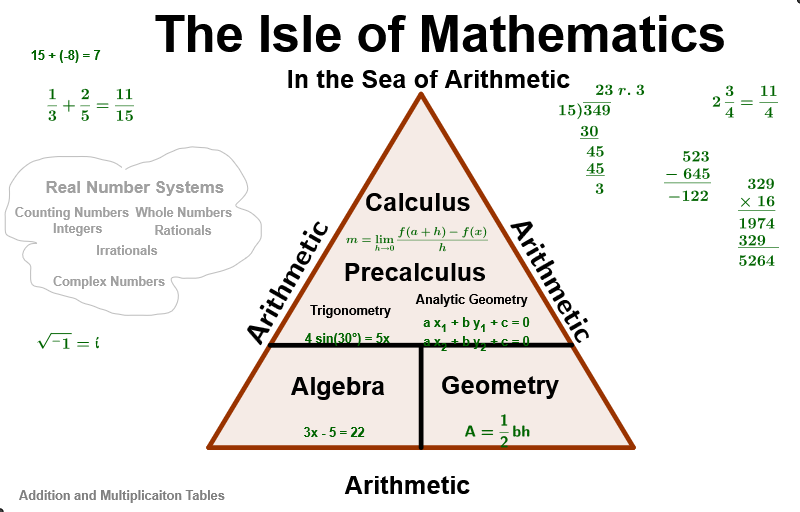
A slide showing students some idea of what fields of mathematics exist. Through rotating text and geometric construction, multiple mathematical concepts are demonstrated. Commands used include Intersect, Point, Polygon, Element, RotateText, etc. Suitable for middle school and above students, for intuitive teaching of mathematical concepts.
GeoGebra Commands & Parameters
Intersect(xAxis, yAxis) → APoint(xAxis) → BPolygon(A, B, 3) → poly1, a, b, c, CElement(wordList, 1) → leg1RotateText(Element[wordList, 1], 60°) → leg2RotateText(Element[wordList, 1], -60°) → leg3Midpoint(A, B) → DSegment(D, E) → line_{DE}Point(c) → FPoint(b) → GSegment(F, G) → dElement(wordList, 2) → area1Element(wordList, 3) → area2Element(wordList, 4) → area4Element(wordList, 5) → area5Element(wordList, 6) → area6Element(wordList, 7) → area7AttachCopyToView(PenStroke[-1.6580,5.5960,-1.7480,5.6560,-1.8680,5.7060,-2.0180,5.7360,-2.1680,5.7760,-2.3180,5.7960,-2.4980,5.7960,-2.6180,5.7960,-2.6980,5.7960,-2.7780,5.7960,-2.8580,5.7960,-2.9780,5.7860,-3.1280,5.7660,-3.2180,5.7360,-3.3280,5.7060,-3.4480,5.6360,-3.5680,5.5360,-3.6580,5.4260,-3.7380,5.3060,-3.7780,5.2160,-3.7780,5.1360,-3.7780,5.0560,-3.7880,4.9460,-3.8280,4.8260,-3.8580,4.7360,-3.8580,4.6560,-3.8580,4.5360,-3.8580,4.4160,-3.8280,4.3160,-3.7080,4.2560,-3.6180,4.2160,-3.4980,4.1960,-3.3480,4.1860,-3.2580,4.1560,-3.3680,4.1460,-3.4780,4.0660,-3.5280,3.9460,-3.4880,3.8360,-3.3880,3.7460,-3.3780,3.6360,-3.3780,3.5560,-3.3780,3.4760,-3.3480,3.3760,-3.2580,3.3360,-3.1480,3.3160,-3.0280,3.2560,-2.9380,3.2160,-2.8580,3.1960,-2.7480,3.1660,-2.6380,3.1360,-2.5280,3.1060,-2.4080,3.0360,-2.2780,2.9960,-2.1580,2.9560,-2.0580,2.9160,-1.9480,2.8860,-1.8380,2.8360,-1.7080,2.8160,-1.5980,2.7960,-1.4780,2.7960,-1.3980,2.7960,-1.2580,2.7960,-1.0980,2.7960,-0.97800,2.8160,-0.84800,2.8260,-0.70800,2.8760,-0.62800,2.9860,-0.58800,3.1060,-0.59800,3.2460,-0.66800,3.3560,-0.71800,3.4910,-0.59800,3.5160,-0.51800,3.4960,-0.43800,3.4960,-0.35800,3.4960,-0.25800,3.4960,-0.14800,3.5160,-0.058000,3.5560,0.052000,3.5860,0.21200,3.6260,0.33200,3.6660,0.45200,3.7160,0.57200,3.7960,0.69200,3.8760,0.79200,3.9660,0.86200,4.0860,0.95200,4.2060,0.98200,4.2960,0.98200,4.3760,0.98200,4.4560,0.96200,4.5660,0.85200,4.6860,0.73200,4.7660,0.61200,4.8060,0.50200,4.8660,0.57200,4.9560,0.67200,5.0660,0.72200,5.1560,0.72200,5.2360,0.69200,5.3360,0.63200,5.4460,0.56200,5.5660,0.47200,5.6860,0.37200,5.7960,0.25200,5.8760,0.16200,5.9160,0.052000,5.9260,-0.038000,5.9560,-0.14800,5.9660,-0.27800,5.9760,-0.35800,5.9760,-0.45800,5.9560,-0.56800,5.9460,-0.68800,5.8960,-0.80800,5.8460,-0.92800,5.7760,-1.0480,5.7260,-1.1380,5.6960,-1.2480,5.6860,-1.3680,5.6460,-1.4880,5.6060,-1.5780,5.5560,NaN,NaN], 1, (-3.9580000000000006, -1.0240000000000014), (11.501999999999999, 8.756000000000002), (0, 489), (773, 0)) → stroke1
AI Drawing Prompt Reference
Draw a coordinate system with intersection point A. Take a point B on the x-axis. Construct a triangle with vertices A, B, and C. Rotate the first word from the list by 60 degrees and -60 degrees to get two new words. Find the midpoint D of A and B, and draw a line segment DE. Take points F and G on line segment DE, and draw a line segment FG. Use the second to seventh words from the list. Draw a pen stroke path with a series of coordinate points.
The prompt above was compiled from the original drawing commands and is for reference only.