
Islamic Geometric Patterns by chris cambré (3)
Loading the math board and drawing, please wait…
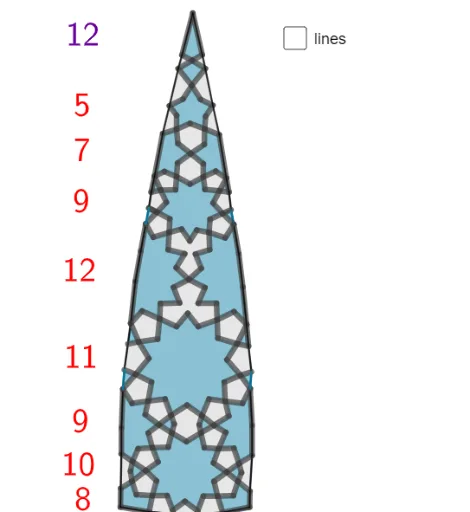
This example demonstrates the construction of Islamic geometric patterns. Key mathematical concepts include symmetry, intersection, and geometric construction. Using GeoGebra commands such as Point, CircleArc, Polygon, PolyLine, Segment, and Intersect, complex geometric patterns can be created. Suitable for middle school students and math enthusiasts.
GeoGebra Commands & Parameters
Point(xAxis) → HPoint(xAxis) → ICircleArc(G, H, I) → cPolygon(V_1, U_1, I_2, J_2, K_2, L_2, M_2, N_2, O_2, P_2, A_2, Z_1, W_1, B_2, C_2, D_2, Q_2, F_2, G_2, H_2) → veelhoek1, v_1, h_2, i_2, j_2, k_2, l_2, m_2, n_2, o_2, p_2, a_2, u_1, z_1, w_1, b_2, c_2, d_2, q_2, f_2, g_2Polygon(S_2, I, S_1, E_2, R_2, C_2) → veelhoek2, s_2, i, s_1, e_2, r_2, fPolygon(T_1, J, B_3, H_1, T_2, U_2, V_2, W_2, Z_2, G_2, A_3) → veelhoek3, t_1, a_3, b_3, j, h_1, t_2, u_2, v_2, w_2, z_2, gPolygon(Q_1, C_3, O, D_3, M_2, E_3, F_3, G_3, H_3, I_3, I_1) → veelhoek4, q_1, i_1, o, c_3, d_3, h, e_3, f_3, g_3, h_3, i_3Polygon(B_3, Q_2, E_2, L_3) → vierhoek1, k, l, m, l_3Polygon(O_2, C_3, K_3, J_3) → vierhoek2, n, p, k_3, j_3Polygon(I_2, W_2, O_3, P_3) → vierhoek3, q, r, o_3, p_3Polygon(F_3, K_2, N_3, M_3) → vierhoek4, s, t, n_3, m_3Polygon(O_3, Q_3, A_4, B_4, C_4, D_4, E_4, F_4, G_4, H_4, H_3, I_4, U_2, M_3, J_4, R_3, S_3, T_3, U_3, V_3, W_3, Z_3) → veelhoek5, d, z_3, a_4, b_4, c_4, d_4, e_4, f_4, g_4, h_4, f_1, q_3, i_4, g_1, j_4, e, r_3, s_3, t_3, u_3, v_3, w_3Polygon(U_3, F_1, E_1) → driehoek1, e_1, j_1, k_1Polygon(D_1, K_4, W_3, T_4, E_1, K, L, L_4, M_4, N_4, O_4, P_4, Q_4, R_4, S_4) → veelhoek6, d_1, s_4, l_1, t_4, m_1, k_5, l_5, k_4, l_4, m_4, n_4, o_4, p_4, q_4, r_4Polygon(B_1, A_1, V_4) → driehoek2, v_4, b_1, a_1Polygon(V_4, W_4, H_5, I_5, J_5, K_5, L_4, L_5, U_4, M_5, Z_4, A_5, B_5, C_5, D_5, E_5, F_5, G_5) → veelhoek7, n_1, g_5, h_5, i_5, j_5, p_1, r_1, c_1, u_4, m_5, w_4, z_4, a_5, b_5, c_5, d_5, e_5, f_5Polygon(A_1, W, N_5, O_5, P_5, Q_5, Z_4, R_5) → veelhoek8, n_5, w, p_5, o_5, q_5, r_5, s_5, t_5Polygon(N_5, S_5, U, T_5, U_5, V_5, V, W_5, Z_5, A_6) → veelhoek9, f_6, a_6, g_6, u, h_6, u_5, v_5, v, w_5, z_5Polygon(U_5, S, B_6, T) → vierhoek5, i_6, s_6, b_6, t_6Polygon(Q, P, R, B_6) → vierhoek6, q_6, p_6, r_6, j_6Polygon(O_1, C_6, B_5, D_6, P_5, E_6, Z_5, Z) → veelhoek10, o_1, c_6, k_6, d_6, l_6, e_6, m_6, z_6Polygon(P_1, D_5, O_1) → driehoek3, n_6, f_7, g_7Polygon(L_1, F_6, H_5, M_6, M_1, M, N, C_4, G_6, H_6, I_6, P_4, J_6, K_6, L_6) → veelhoek11, h_7, r_7, s_7, t_7, a_7, m_8, n_8, i_7, j_7, k_7, l_7, m_7, n_7, p_7, q_7PolyLine(I, S_1, D_1, C_1, B_1, A_1, T_1, J, H_1, G_1, F_1, E_1, K, L) → b_7PolyLine(O_1, P_1, O, Q_1, R_1, H, N_1, M_1, M, N, L_1, K_1, J_1, I_1) → c_7PolyLine(A_1, W, O_1, U, S, Q, P, R, T, V, Z) → d_7Point(c) → N_6Polygon(H, N_6, A_2, O_6, J_3, R_1) → veelhoek12, h_8, e_7, f_8, o_6, g_8, i_8Point(c) → P_6Polygon(I, S_1, D_1, C_1, B_1, A_1, W, U, S, Q, P, R, T_1, T, V, Z, O_1, P_1, N_1, M_1, M, N, L_1, J, K_1, J_1, I_1, O, Q_1, R_1, H, N_6, P_6, S_2, H_1, G_1, F_1, E_1, K, L) → veelhoek13, j_8, b_8, c_8, d_8, e_8, f_9, g_9, h_9, i_9, j_9, k_9, k_8, l_9, m_9, n_9, p_9, q_9, r_9, s_9, t_9, a_9, b_9, l_8, c_9, d_9, e_9, f_{10}, g_{10}, h_{10}, i_{10}, j_{10}, k_{10}, l_{10}, p_8, m_{10}, q_8, r_8, s_8, t_8, a_8Segment(N_1, F_5) → n_{10}Segment(U_4, C_1) → p_{10}Segment(K_1, E_4) → q_{10}Polygon(K_1, E_4, L_1) → driehoek4, r_{10}, s_{10}, t_{10}Segment(L_1, E_4) → a_{10}Polygon(I_1, G_4, J_1) → driehoek5, b_{10}, c_{10}, d_{10}Polygon(G_1, S_3, H_1) → driehoek6, e_{10}, f_{11}, g_{11}Polygon(M_1, F_5, N_1) → driehoek7, h_{11}, i_{11}, j_{11}Polygon(D_1, C_1, U_4) → driehoek8, k_{11}, l_{11}, m_{11}Intersect(c, k_{10}, 2) → Q_6Point(xAxis) → R_6Point(xAxis) → B_7Polygon(Q_6, R_6, S_6, T_6, U_6, V_6, W_6, Z_6, A_7, B_7) → veelhoek14, n_{11}, a_{11}, p_{11}, q_{11}, r_{11}, u_6, v_6, w_6, s_{11}, t_{11}Point(b_7) → C_7Segment(T_6, C_7) → b_{11}Point(k_8) → D_7Segment(S_6, D_7) → c_{11}Point(h_{10}) → E_7Segment(Z_6, E_7) → d_{11}Point(h_{10}) → F_7Segment(A_7, F_7) → e_{11}Polygon(G_7, H_7, Q_7, I_7, J_7, K_7, L_7, M_7, N_7, O_7, P_7) → veelhoek15, f_{12}, n_{12}, b_{13}, g_{12}, h_{12}, i_{12}, j_{12}, k_{12}, l_{12}, m_{12}, o_7Segment(Q_7, W_6) → q_{12}Segment(H_7, U_6) → r_{12}Point(h_7) → R_7Point(s_9) → W_7PolyLine(R_7, N_7, M_7, S_7, T_7, U_7, V_7, W_7) → p_{12}Point(j_1) → Z_7Point(b_7) → C_8PolyLine(Z_7, K_7, L_7, S_7, T_7, A_8, B_8, C_8) → s_{12}PolyLine(B_8, D_8, E_8, F_8, G_8, H_8, V_7, U_7, A_8) → t_{12}Point(f_7) → I_8Point(n_9) → K_8PolyLine(I_8, G_8, F_8, J_8, K_8) → a_{12}Point(v_4) → L_8Point(g_9) → M_8PolyLine(L_8, E_8, F_8, J_8, M_8) → b_{12}Point(m_9) → N_8Point(h_9) → O_8Segment(N_8, O_8) → c_{12}
AI Drawing Prompt Reference
Create a complex symmetric Islamic geometric pattern. Start by placing two points on a horizontal axis and drawing a circular arc through them. Then, arrange a series of polygons—triangles, quadrilaterals, and higher-order polygons—around the arc and axis, interlocking and nesting to form star-like and petal-shaped motifs. Use polylines to outline the main skeletal framework of the pattern. Place additional points on the arc and connect them to polygon vertices with segments, creating internal subdivisions. Finally, add new points on the axis and construct a large polygon incorporating them, while selecting points from the polylines and polygons to draw connecting segments, completing the intricate symmetrical design.
The prompt above was compiled from the original drawing commands and is for reference only.