
Islamic Geometric Pattern Division and Symmetry Construction
Loading the math board and drawing, please wait…
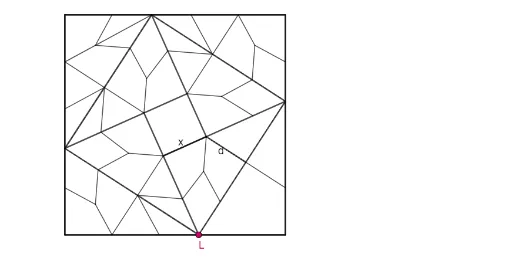
① This example demonstrates how to construct an Islamic-style geometric pattern by dividing and combining basic polygons through symmetry, rotation, and reflection. ② Core mathematical concepts include symmetry, median lines, angle bisectors, rotational and mirror transformations, with potential use of the Pythagorean theorem in underlying measurements. ③ Construction highlights: using GeoGebra commands such as Polygon, Point, Segment, Circle, Ray, Line, Intersect, Rotate, Mirror, OrthogonalLine, AngularBisector, and Textfield, along with ConstructionStep to create an interactive step-by-step build. ④ Suitable for middle school to university geometry classes, especially for teaching symmetry, transformation geometry, and pattern design, as well as interdisciplinary projects linking mathematics and art.
GeoGebra Commands & Parameters
Intersect(xAxis, yAxis) → AConstructionStep() → stapPolygon(A, B, 4) → veelhoek1, f, g, h, i, C, DPoint(i) → ESegment(A, E) → jRotate(F, 90°, G) → F'Rotate(F, (-(90°)), G) → F'_1Mirror(F, G) → F'_2Segment(F, F'_1) → kMirror(D, k) → D'Rotate(D', 90°, G) → D''Rotate(D', (-(90°)), G) → D''_1Mirror(D', G) → D''_2Segment(F, D') → lSegment(F'_1, D''_1) → mSegment(F'_2, D''_2) → nSegment(F', D'') → pSegment(F'_1, F'_2) → qSegment(F'_2, F') → rSegment(F', F) → sOrthogonalLine(D''_1, r) → tIntersect(t, r) → HSegment(D''_1, H) → dSegment(D''_2, D''_1) → aTextfield(F) → Invulvak1OrthogonalLine(D'', k) → bIntersect(b, k) → ISegment(I, D'') → cOrthogonalLine(D''_2, s) → eIntersect(e, s) → JSegment(D''_2, J) → f_1OrthogonalLine(D', q) → g_1Intersect(g_1, q) → KSegment(D', K) → h_1Segment(F, F'_1) → i_1Segment(F'_1, F'_2) → j_1Segment(F'_2, F') → k_1Segment(F', F) → l_1Segment(D''_1, H) → m_1Intersect(b, i) → LSegment(L, I) → n_1Intersect(e, f) → MSegment(J, M) → p_1Intersect(g_1, h) → NSegment(K, N) → q_1Intersect(t, g) → OSegment(H, O) → r_1Segment(L, F'_1) → s_1Circle(H, D''_1) → c_1Intersect(r, k_1) → PIntersect(r, k_1) → QIntersect(r, k_1) → RIntersect(r, k_1) → SIntersect(c_1, k_1, 2) → TCircle(F', T) → d_1Intersect(d_1, p, 1) → USegment(J, U) → t_1Intersect(d_1, f, 1) → VSegment(J, V) → a_1Intersect(c_1, n, 1) → WAngularBisector(U, D''_2, D''_1) → b_1AngularBisector(D''_1, H, T) → e_1Intersect(b_1, e_1) → ZSegment(D''_1, Z) → f_2Segment(Z, U) → g_2Segment(Z, T) → h_2Circle(K, N) → c_2Intersect(q, j_1) → A_1Intersect(c_2, j_1, 2) → B_1Circle(F'_2, B_1) → d_2Intersect(d_2, g, 2) → C_1AngularBisector(B_1, K, N) → i_2AngularBisector(C_1, F'_2, B_1) → j_2Intersect(i_2, j_2) → D_1Segment(B_1, D_1) → k_2Segment(D_1, C_1) → l_2Segment(D_1, N) → m_2AngularBisector(B_1, F'_2, W) → n_2AngularBisector(D', K, B_1) → p_2Intersect(n_2, p_2) → E_1Segment(D', E_1) → q_2Segment(E_1, B_1) → r_2Segment(E_1, W) → s_2Circle(I, D'') → e_2Circle(D', D'') → t_2Intersect(k, i_1) → F_1Intersect(k, i_1) → G_1Intersect(k, i_1) → H_1Intersect(k, i_1) → I_1Intersect(e_2, i_1, 2) → J_1AngularBisector(D'', I, J_1) → a_2Intersect(t_2, m, 1) → K_1AngularBisector(K_1, D', D'') → b_2Intersect(a_2, b_2) → L_1Segment(D'', L_1) → f_3Segment(L_1, J_1) → g_3Segment(L_1, K_1) → h_3Segment(K_1, K) → i_3Circle(K, K_1) → c_3Circle(D'', D''_2) → d_3Intersect(d_3, l, 1) → M_1Circle(F, M_1) → e_3Intersect(s, l_1) → N_1Intersect(s, l_1) → O_1Intersect(e_3, l_1, 1) → P_1AngularBisector(M_1, F, P_1) → j_3AngularBisector(D''_2, J, P_1) → k_3Intersect(k_3, j_3) → Q_1Segment(M_1, Q_1) → l_3Segment(Q_1, P_1) → m_3Segment(Q_1, D''_2) → n_3Segment(M_1, I) → p_3Circle(F, M_1) → q_3Intersect(q_3, i, 1) → R_1Segment(R_1, I) → r_3Circle(A, M) → s_3Intersect(i, j) → S_1Intersect(i, j) → T_1Intersect(s_3, i, 1) → U_1AngularBisector(M, A, U_1) → t_3AngularBisector(P_1, J, M) → a_3Intersect(t_3, a_3) → V_1Segment(U_1, V_1) → b_3Segment(V_1, P_1) → f_4Segment(V_1, M) → g_4AngularBisector(J_1, I, L) → h_4Intersect(h_4, s_1) → W_1Segment(W_1, J_1) → i_4Circle(D, L) → c_4Intersect(c_4, h, 1) → Z_1Segment(W_1, Z_1) → j_4AngularBisector(N, K, F'_1) → k_4Mirror(Z_1, F'_1) → A_2Segment(A_2, K) → l_4AngularBisector(C, B, A) → m_4Point(m_4) → B_2Circle(B, B_2) → d_4Segment(B, B_2 + Vector[B, B_2]) → b_4Intersect(d_4, f, 1) → C_2Circle(C_2, B) → e_4Intersect(e_4, f, 2) → D_2Ray(D_2, B_2) → n_4Intersect(g, n_4) → E_2Segment(D_2, E_2) → p_4Circle(E_2, ll) → q_4Intersect(q_4, g, 1) → F_2Circle(F_2, ll) → r_4Intersect(r_4, g, 2) → G_2Segment(D_2, G_2) → s_4Segment(H_2, F') → a_4Line(C, s_4) → t_4Polygon(F, F'_1, F'_2, LL) → vierhoek1, f_5, f'_1, f'_2, g_5
AI Drawing Prompt Reference
Start with a square centered at the origin. Take a point on one side and rotate it by plus and minus 90 degrees around the center, then mirror it across the center line, creating three symmetric points. Connect these points to form an inner star-like polygon. Then draw perpendicular lines from certain points to opposite sides, find their intersections, and connect these intersections to create a symmetric Islamic geometric pattern. The final figure consists of the square outline and internal symmetric line segments, emphasizing rotational and mirror symmetry.
The prompt above was compiled from the original drawing commands and is for reference only.