
Irrational Numbers Demo
Loading the math board and drawing, please wait…
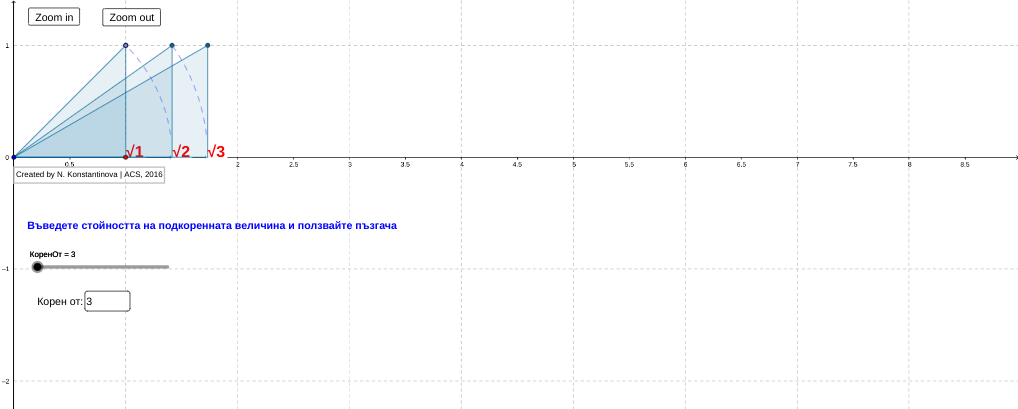
This example demonstrates the geometric representation and properties of irrational numbers through dynamic visuals. It involves core concepts like irrational numbers, square roots, and geometric constructions. Key GeoGebra commands used include Sequence, Point, Textfield, and Polygon to create sequence points, text fields, and polygons. Suitable for high school mathematics education to understand the intuitive meaning and calculation methods of irrational numbers.
GeoGebra Commands & Parameters
Sequence((sqrt(d), 0), d, 1, КоренОт, 1) → list2, {(1, 0), (1.4142135623730951, 0), (1.7320508075688772, 0)}Sequence((sqrt(d), 1), d, 1, КоренОт, 1) → list3, {(1, 1), (1.4142135623730951, 1), (1.7320508075688772, 1)}Sequence(Segment[Element[list2, i], Element[list3, i]], i, 1, КоренОт) → list4, {1, 1, 1}Point(yAxis) → ASequence(Segment[A, Element[list3, i]], i, 1, КоренОт) → list6, {1.4142135623730951, 1.7320508075688772, 2}Sequence(CircleArc[A, Element[list2, i], Element[list3, i - 1]], i, 2, КоренОт) → list1, {1.1107207345395915, 1.0660421264448015}Textfield(КоренОт) → RadicandSequence(Text[sqrt(d), (sqrt(d), 0)], d, 1, КоренОт, 1) → list5, {"1", "1.414", "1.732"}Sequence(Text[(text3 * d), (sqrt(d), 0)], d, 1, КоренОт, 1) → list7, {"√1", "√2", "√3"}Point(list3) → BPoint(xAxis) → DPolygon(B, C, D) → poly1, d, b_1, c_1Sequence(Polygon[C, Element[list2, i], Element[list3, i]], i, 1, КоренОт) → list8, {0.5, 0.7071067811865476, 0.8660254037844386}
AI Drawing Prompt Reference
Create a dynamic visual demonstrating the geometric representation and properties of irrational numbers, featuring a sequence of points for square roots starting from 1, their projections on the x and y axes, connecting line segments, and circular arcs, with labels showing the square root values at each point, and polygons illustrating related geometric constructions to intuitively show the calculation methods and geometric meaning of irrational numbers.
The prompt above was compiled from the original drawing commands and is for reference only.