
Vector Addition of Two Vectors (Parallelogram Rule)
Loading the math board and drawing, please wait…
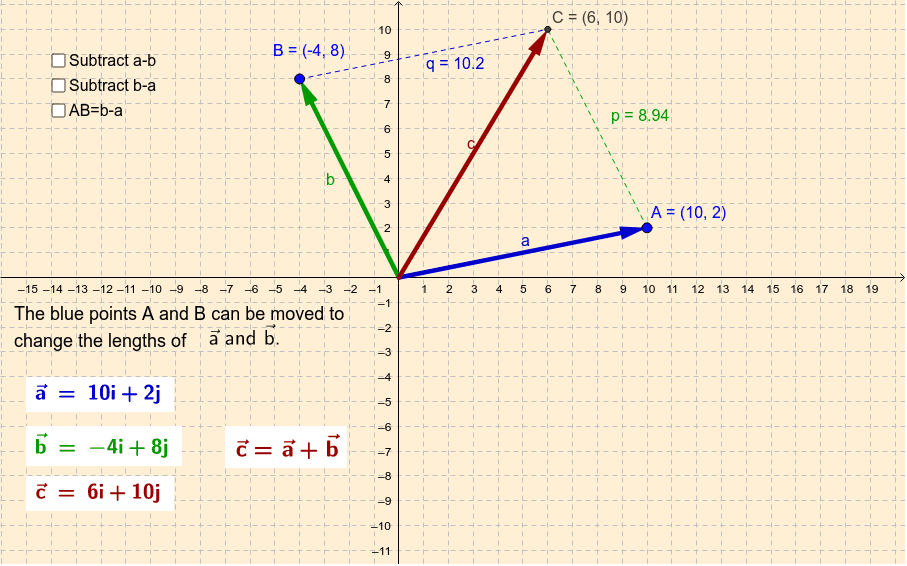
This example demonstrates the vector addition of two vectors using the parallelogram rule. Key mathematical concepts include vector addition and geometric construction. It utilizes commands such as Vector, Line, Intersect, Segment, and Point in GeoGebra. Suitable for high school math education and students learning vector addition.
GeoGebra Commands & Parameters
Vector(A) → aVector(B) → bLine(B, a) → mLine(A, b) → nIntersect(m, n) → CSegment(A, C) → pSegment(B, C) → qVector(D) → uVector(A + D) → vPoint(v) → ESegment(A, E) → eSegment(E, D) → fPoint(j) → FPoint(i) → GSegment(F, B) → kSegment(F, G) → lVector(A, B) → w
AI Drawing Prompt Reference
Draw two vectors starting from the origin, each pointing to a distinct point, and label them. Using these two vectors as adjacent sides, construct a parallelogram: from the tip of one vector draw a line parallel to the other vector, and from the tip of the other vector draw a line parallel to the first vector; these two lines intersect at a point, which is the endpoint of the sum vector. Connect the origin to this intersection point to show the resultant vector. Then draw another vector from the origin, and a reverse vector from its tip back to the origin, connecting relevant points to form a triangle. Finally, draw a segment between two given points and label all key points.
The prompt above was compiled from the original drawing commands and is for reference only.