
Investigating the Properties of Parallelograms
Loading the math board and drawing, please wait…
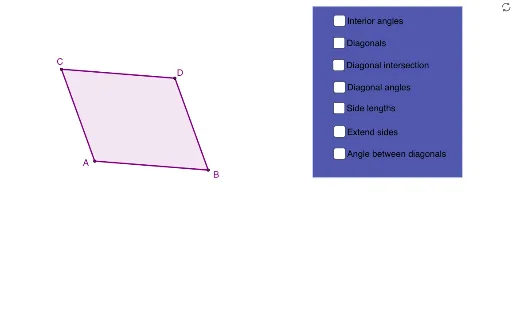
This interactive GeoGebra example dynamically demonstrates the fundamental properties of parallelograms, including opposite sides parallel and equal, opposite angles equal, and diagonals bisecting each other. Core mathematical concepts involve the definition of parallelograms, vectors, angle relationships, and polygon attributes. Construction highlights: using GeoGebra commands such as Line, Intersect, Polygon, Segment, and Angle, points A, B, C, D and sides a, b, c, d are created, forming polygon poly1; segments AD, CB, CD, DB, BA, AC and angles α, β, γ, δ etc. illustrate side-angle relations; vector and 3D vector concepts, along with cosine and definite integral extensions, are also touched. Suitable for middle school to high school students, this resource supports geometry property exploration, classroom demonstration, or self-paced experiments, fostering understanding of parallelogram criteria and dynamic geometric thinking.
GeoGebra Commands & Parameters
Line(A, B) → aLine(C, a) → bLine(A, C) → cLine(B, c) → dIntersect(b, d) → DPolygon(C, A, B, D) → poly1, c_1, a_1, b_1, d_1Segment(A, D) → ADSegment(C, B) → CBSegment(C, D) → CDSegment(D, B) → DBSegment(B, A) → BASegment(A, C) → ACSegment(D, A) → gSegment(C, B) → hAngle(g, h) → αSegment(A, D) → jSegment(C, B) → kAngle(B, A, D) → βAngle(D, A, C) → γAngle(A, C, B) → δAngle(B, C, D) → εAngle(C, D, A) → ζAngle(A, D, B) → ηAngle(D, B, C) → θAngle(C, B, A) → ιIntersect(j, k) → ESegment(E, C) → ECSegment(E, D) → EDSegment(E, B) → EBSegment(E, A) → EALine(C, A) → nLine(A, B) → pLine(B, D) → qLine(D, C) → rPolygon(F, G, H, I) → poly2, f_1, g_1, h_1, i_1Angle(poly1) → κ, λ, μ, ν
AI Drawing Prompt Reference
Draw a parallelogram. Start by drawing two intersecting lines as diagonals. Through the two endpoints of one line, draw lines parallel to the other diagonal; their intersection gives the fourth vertex, completing the parallelogram. Label the four vertices, connect the sides, and draw both diagonals. Mark all interior angles. Show the intersection point of the diagonals and draw segments from it to each vertex. Finally, draw a smaller parallelogram nearby and label all its interior angles to illustrate the properties.
The prompt above was compiled from the original drawing commands and is for reference only.