
Defining a Reflection
Loading the math board and drawing, please wait…
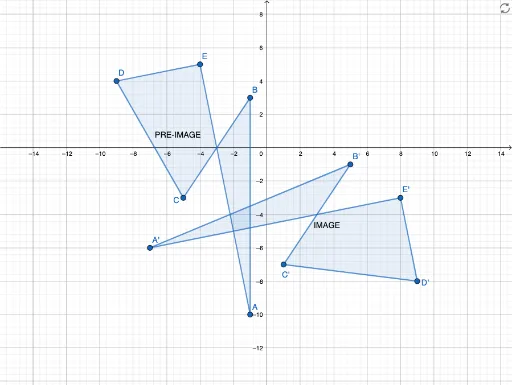
This example demonstrates how to define and visualize a reflection transformation of a shape using GeoGebra. Core math concepts include reflection, coordinate geometry, and vector transformations. Construction highlights involve commands like Polygon to create polygons, objects A, B, C, D, E for vertices, poly1, poly2 for pre-reflection and post-reflection shapes, and auxiliary objects a, b, c, d, e for calculations and display, with text1, text2 for annotations. Suitable for high school students learning geometric transformations and their properties.
GeoGebra Commands & Parameters
Polygon(A, B, C, D, E) → poly1, a, b, c, d, ePolygon(A', B', C', E', D') → poly2, f, g, h, i, j
AI Drawing Prompt Reference
Draw a pentagon ABCDE first, then create another pentagon A'B'C'D'E' through reflection. Start by creating pentagon ABCDE with points A, B, C, D, E. Next, reflect points A, B, C, D, E across lines a, b, c, d, e to get A', B', C', D', E', forming pentagon A'B'C'D'E'.
The prompt above was compiled from the original drawing commands and is for reference only.