
Investigating Properties of Isosceles Right Triangles by Tim Brzezinski
Loading the math board and drawing, please wait…
In collections
Special Right Triangle (1): Thinking Classroom Exploration
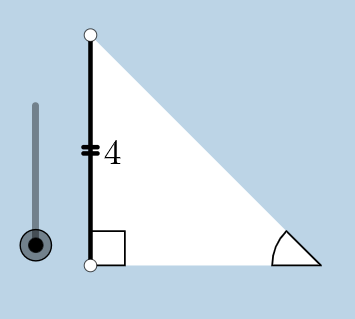
This example demonstrates the properties of isosceles right triangles, involving key mathematical concepts such as triangles, right triangles, and isosceles triangles. Using GeoGebra commands like Circle, Segment, OrthogonalLine, Rotate, etc., an isosceles right triangle can be constructed and its properties further explored. Suitable for middle school and above students or teachers.
GeoGebra Commands & Parameters
Circle(B, C) → cSegment(B, C) → aOrthogonalLine(C, a) → bRotate(C, 45°, B) → C'Angle(C, B, C') → αRay(B, C') → dIntersect(b, d) → ASegment(A, C) → eSegment(B, A) → fPolygon(B, C, A) → poly1, a_1, b_1, c_1Line(B, C) → hPoint(h) → DPoint(h) → ERay(C, E) → iPoint(i) → FRay(C, F) → jDilate(B, If[0 < g ≤ 1, 1 - g, 0], C) → B'Segment(B, B') → kDilate(C, If[1 < g ≤ 2, 2 - g, 0], A) → C'_1Segment(C, C'_1) → lCircle(C, (0.2 * a)) → pIntersect(p, j, 1) → GIntersect(p, e, 1) → HIntersect(p, a, 1) → ICircle(A, (0.2 * a)) → qIntersect(q, e, 1) → JIntersect(q, f, 1) → KCircleSector(C, H, I) → sDilate(A, If[2 < g ≤ 3, 3 - g, 0], B) → A'Segment(A, A') → mCircleSector(A, K, J) → tRotate(s, If[3.5 < g ≤ 4.5, ((-(g - 3.5)) * pi / 2), -1.5707963267948966], C) → s'Dilate(A, If[5.5 < g ≤ 6.5, 6.5 - g, 0], B) → A'_1Vector(A, A'_1) → uTranslate(t, u) → t'Rotate(B, If[16 < g ≤ 17, ((-(g - 16)) * pi / 2), ((-pi)) / 2], C) → B'_1Rotate(B', If[4.5 < g ≤ 5.5, ((-(g - 4.5)) * pi / 2), -1.5707963267948966], C) → B''Segment(B'_1, B'') → k'Rotate(t', If[6.5 < g ≤ 7.5, (((-(g - 6.5)) * 5) * pi / 4), -3.92699], B) → t''Dilate(A, If[7.5 < g ≤ 8.5, 8.5 - g, 0], C) → A'_2Vector(A, A'_2) → vTranslate(t, v) → t'_1Rotate(t'_1, If[8.5 < g ≤ 9.5, (((-(g - 8.5)) * 3) * pi / 4), -2.356194490192345], C) → d_1Dilate(A, If[9.5 < g ≤ 10.5, 10.5 - g, 0], C) → A'_3Vector(A, A'_3) → wTranslate(t, w) → t'_2Rotate(t'_2, If[10.5 < g ≤ 11.5, ((-(g - 10.5)) * pi / 2), -1.5707963267948966], C) → e_1Angle(C, B, B'_1) → γAngle(B, C'_1, C) → βAngle(C'_1, C, B) → δCircle(B, (0.2 * a)) → r
AI Drawing Prompt Reference
Draw an isosceles right triangle by first creating a base segment, then constructing a circle centered at one endpoint, drawing a perpendicular line through the other endpoint, and rotating a point 45 degrees to find the right-angle vertex. Add a slider-controlled dynamic point on the base, and use it to create sliding segments, rotating sectors, and translated shapes that illustrate angle and side relationships. Include auxiliary circles, rays, and multiple draggable points for interactive exploration.
The prompt above was compiled from the original drawing commands and is for reference only.