
Intuitive Introduction to Surface Area
Loading the math board and drawing, please wait…
In collections
Geometry - Areas and Volumes
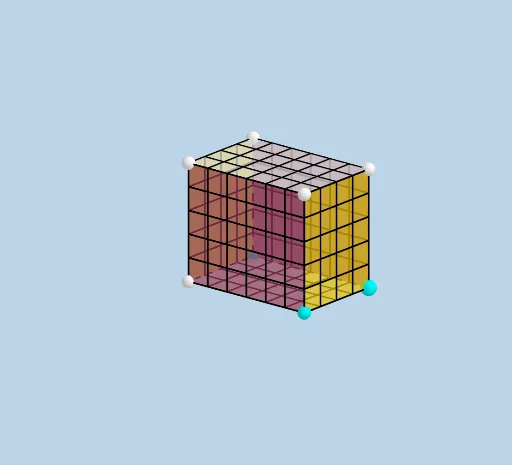
This example demonstrates how to construct a prism and its net using GeoGebra, providing an intuitive understanding of surface area. Key math concepts include area calculation, polygon unfolding, and vector operations. The construction utilizes commands like Ray, Prism, Net, Sequence, Translate, Vector, Mirror, along with objects such as LENGTH, WIDTH, HEIGHT, A, B, C, f, g, h, Filling, D, E, d, F, G, H, faceADBE, faceAECF, faceADGF, faceBDGH, faceBECH, faceCFGH, edgeAE, edgeAD, edgeBD, edgeBE, edgeCE, edgeAF, edgeDG, edgeBH, edgeCF, edgeFG, edgeGH, edgeCH, openclose, i, I, J, K, L. Suitable for middle school students and above to learn solid geometry and understand surface area calculation methods, or for mathematical teaching demonstrations.
GeoGebra Commands & Parameters
Ray((0, 0, 0), (1, 0, 0)) → fRay((0, 0, 0), (0, 1, 0)) → gRay((0, 0, 0), (0, 0, 1)) → hPrism(E, A, D, B, C) → d, F, edgeAE, edgeAD, edgeBD, edgeBE, edgeCE, edgeAF, edgeDG, edgeBH, edgeCF, edgeFG, G, edgeGH, edgeCH, H, faceADBE, faceAECF, faceADGF, faceBDGH, faceBECH, faceCFGHNet(d, openclose) → i, I, R, S, T, U, V, faceIJKL, faceIJNM, faceJKPO, faceKLRQ, faceILST, J, faceMNUV, edgeIJ, edgeJK, edgeKL, edgeIL, edgeIM, edgeMN, edgeJN, edgeJO, edgeOP, K, edgeKP, edgeKQ, edgeQR, edgeLR, edgeLS, edgeST, edgeIT, edgeNU, edgeUV, edgeMV, L, M, N, O, P, QSequence(Segment[(i, 0, 0), (i, WIDTH, 0)], i, 1, LENGTH - 1, 1) → L_1Translate(L_1, Vector[A, F]) → L_2Sequence(Segment[(0, i + 1, 0), (LENGTH, i + 1, 0)], i, 0, WIDTH - 2) → L_3Translate(L_3, Vector[A, F]) → L_4Vector(M, V) → uSequence((x(M) + i, y(M), z(M)), i, 1, LENGTH - 1, 1) → L_5Translate(L_5, u) → L_6Sequence(Segment[Element[L_5, i], Element[L_6, i]], i, 1, LENGTH - 1) → L_7Sequence((x(M), y(M) + (i * y(u) / WIDTH), z(M) + (i * z(u) / WIDTH)), i, 1, WIDTH - 1, 1) → L_8Vector(V, U) → vTranslate(L_8, v) → L_9Sequence(Segment[Element[L_8, i], Element[L_9, i]], i, 1, WIDTH - 1) → L_{10}Vector(A, O) → wSequence((x(A) + (i * x(w) / HEIGHT), y(A), z(A) + (i * z(w) / HEIGHT)), i, 1, HEIGHT - 1, 1) → L_{11}Vector(O, P) → lTranslate(L_{11}, l) → L_{12}Sequence(Segment[Element[L_{11}, i], Element[L_{12}, i]], i, 1, HEIGHT - 1) → L_{13}Sequence((x(O), y(O) + (i * y(l) / WIDTH), z(O) + (i * z(l) / WIDTH)), i, 1, WIDTH - 1, 1) → L_{14}Translate(L_{14}, Vector[(-w)]) → L_{15}Sequence(Segment[Element[L_{14}, i], Element[L_{15}, i]], i, 1, WIDTH - 1) → L_{16}Mirror(L_{13}, k) → L_{17}Mirror(L_{16}, k) → L_{18}Vector(D, Q) → mSequence((x(B) + (i * x(v) / LENGTH), y(B), z(B)), i, 1, LENGTH - 1, 1) → L_{19}Translate(L_{19}, m) → L_{20}Sequence(Segment[Element[L_{19}, i], Element[L_{20}, i]], i, 1, LENGTH - 1) → L_{21}Sequence((x(B), y(B) + (i * y(m) / HEIGHT), z(B) + (i * z(M) / HEIGHT)), i, 1, HEIGHT - 1, 1) → L_{22}Translate(L_{22}, v) → L_{23}Sequence(Segment[Element[L_{22}, i], Element[L_{23}, i]], i, 1, HEIGHT - 1) → L_{24}Mirror(L_{21}, n) → L_{25}Mirror(L_{24}, n) → L_{26}
AI Drawing Prompt Reference
Draw a rectangular prism and its net. Start by drawing the three coordinate axes, then use these axes to construct the rectangular prism. Next, unfold the prism into a flat shape, showing all its faces. Finally, use translation and rotation to connect the faces of the net into a complete net.
The prompt above was compiled from the original drawing commands and is for reference only.