
Intuitive Derivative Graphing Exercise: Visualizing Function and Derivative
Loading the math board and drawing, please wait…
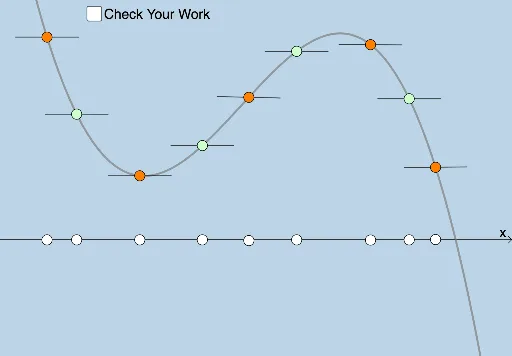
① This interactive exercise demonstrates the graphical relationship between a function and its derivative, allowing learners to intuitively grasp the geometric meaning of derivatives. ② Core mathematical concepts include derivatives, tangent slopes, rate of change, and derivatives of trigonometric functions, with auxiliary elements like geometric mean and circumcircles enriching the context. ③ Construction uses GeoGebra commands such as FitPoly for polynomial fitting, Point, Circle, Intersect, and Segment to build key points, circles, and segments; multiple objects (A, B, C, D, f, g, h, etc.) generate varied functions and their derivatives f', with a random generator producing multiple practice sets. ④ Suitable for high school to early college calculus students, ideal for classroom demonstrations or self-paced practice to strengthen intuitive understanding of how derivative graphs relate to original functions.
GeoGebra Commands & Parameters
FitPoly({A, B, C, D}, 3) → fPoint(g) → EPoint(h) → FPoint(i) → GPoint(j) → HCircle(A, 1) → cCircle(B, 1) → dCircle(C, 1) → eCircle(D, 1) → pIntersect(c, k, 1) → IIntersect(c, k, 2) → JIntersect(d, l) → K, LIntersect(e, m) → M, NIntersect(p, n) → O, PSegment(I, J) → qSegment(K, L) → rSegment(M, N) → sSegment(O, P) → tPoint(f) → QPoint(a) → RCircle(Q, 1) → c_1Intersect(c_1, b) → S, TSegment(S, T) → f_1Point(f) → VPoint(f) → WPoint(f) → ZPoint(f) → A_1Point(g_1) → B_1Point(h_1) → C_1Point(i_1) → D_1Point(j_1) → E_1Circle(V, 1) → d_1Circle(W, 1) → e_1Circle(Z, 1) → p_1Circle(A_1, 1) → q_1Intersect(p_1, m_1) → F_1, G_1Intersect(q_1, n_1) → H_1, I_1Intersect(e_1, l_1) → J_1, K_1Intersect(d_1, k_1) → L_1, M_1Segment(L_1, M_1) → r_1Segment(J_1, K_1) → s_1Segment(F_1, G_1) → t_1Segment(H_1, I_1) → a_1
AI Drawing Prompt Reference
Start by fitting a cubic polynomial curve through four control points to create the original function in a coordinate system, then place several points on this curve. Draw unit circles centered at some control points of the function and find their intersection points with several given lines, connecting each pair of intersections with line segments to form secants. Place multiple points on both the original function and its derivative, draw unit circles at these points, and similarly find intersections with another set of lines, connecting the resulting intersection pairs. The overall composition shows the function graph, its derivative graph, and geometric relationships constructed through circles and line intersections, illustrating the concept of derivative as tangent slope and rate of change.
The prompt above was compiled from the original drawing commands and is for reference only.