
Introduction to the Law of Cosines with Interactive GeoGebra Construction
Loading the math board and drawing, please wait…
In collections
Grade 12 Calculus & Vectors MCV4U1
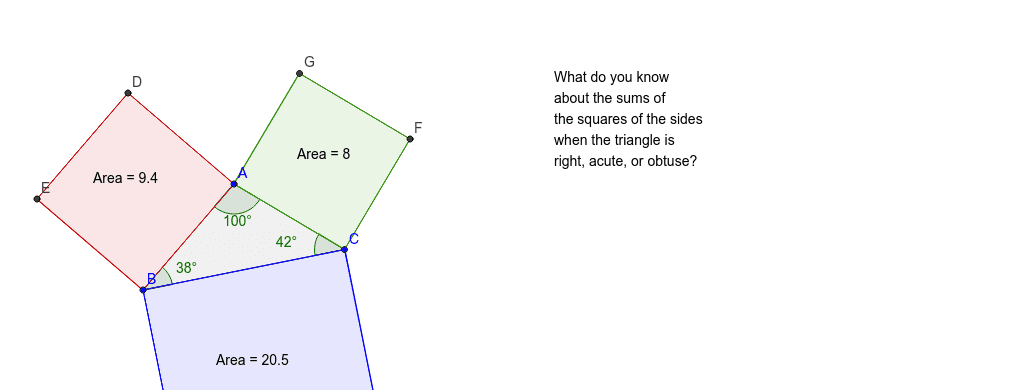
This GeoGebra example illustrates the Law of Cosines for triangles and general quadrilaterals, extending the Pythagorean theorem to non‑right triangles. The construction uses Polygon and Angle commands to create dynamic shapes (triangle, kite) and displays angles α, β, γ together with side lengths a, b, c. Learners can manipulate vertices to verify the relationships, making it ideal for high‑school geometry and trigonometry lessons.
GeoGebra Commands & Parameters
Polygon(A, B, C) → poly1, c, a, bPolygon(B, A, 4) → poly2, b_1, a_1, d, e, D, EPolygon(A, C, 4) → poly3, a_2, c_1, f, g, F, GPolygon(C, B, 4) → poly4, c_2, b_2, h, i, H, IAngle(poly1) → α, β, γ
AI Drawing Prompt Reference
Draw a triangle ABC, then draw a quadrilateral BACD starting from B, a quadrilateral ABCE starting from A, and a quadrilateral ACFG starting from C. Finally, measure the three angles α, β, and γ of triangle ABC.
The prompt above was compiled from the original drawing commands and is for reference only.