
Introduction to Rotational Symmetry
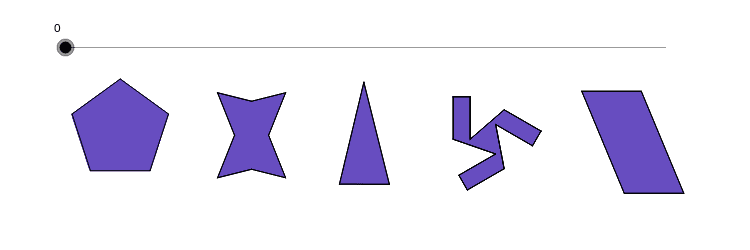
Loading the math board and drawing, please wait…
This example demonstrates the concept of rotational symmetry in polygons. Key math concepts include symmetry, axes of symmetry, and center of rotation. It is constructed using GeoGebra commands like Polygon, Segment, Rotate, Midpoint, Line, Intersect, and OrthogonalLine. Suitable for middle school students and above learning geometric transformations and symmetry.
GeoGebra Commands & Parameters
Polygon(A, B, 5) → poly1, a, b, c, d, e, C, D, EPolygon(F, N, G, M, H, O, J, L) → poly2, f, n, g, m, h, o, j, lSegment(I, K) → iSegment(K, P) → kSegment(P, Q) → pRotate(K, 240*°, R) → K'Rotate(P, 240*°, R) → P'Segment(K', P') → k'Rotate(K', 240*°, R) → K''Rotate(P', 240*°, R) → P''Segment(K'', P'') → k''Rotate(P, 240*°, R) → P'_1Rotate(Q, 240*°, R) → Q'Segment(P'_1, Q') → p'Rotate(I, 120*°, R) → I'Rotate(K, 120*°, R) → K'_1Segment(I', K'_1) → i'Rotate(I, 240*°, R) → I'_1Rotate(K, 240*°, R) → K'_2Segment(I'_1, K'_2) → i'_1Rotate(P, 120*°, R) → P'_2Rotate(Q, 120*°, R) → Q'_1Segment(P'_2, Q'_1) → p'_1Segment(I, Q'_1) → qSegment(Q, I'_1) → rSegment(Q', I') → sPolygon(K, P, Q'_1, I, Q, I'_1, K', P', Q', I', K'', P'') → poly3, k_1, p'', q'_1, i_1, p_1, q_1, i'_2, k'_1, p'_2, q', i'_3, k''_1Polygon(S, T, U, V) → poly4, s_1, t, u, vMidpoint(N, O) → WMidpoint(S, T) → ZMidpoint(S, V) → A_1Line(A_1, s_1) → a_1Line(Z, t) → b_1Intersect(a_1, b_1) → B_1OrthogonalLine(D, a) → c_1OrthogonalLine(C, e) → d_1Intersect(c_1, d_1) → C_1Rotate(poly1, w°, C_1) → poly1'Rotate(F, w°, W) → F'Rotate(N, w°, W) → N'Rotate(G, w°, W) → G'Rotate(M, w°, W) → M'Rotate(H, w°, W) → H'Rotate(O, w°, W) → O'Rotate(J, w°, W) → J'Rotate(L, w°, W) → L'Polygon(F', N', G', M', H', O', J', L') → poly2', f', n', g', m', h', o', j', l'Rotate(K, w°, R) → K'_3Rotate(P, w°, R) → P'_3Rotate(Q, w°, R) → Q'_2Rotate(I'_1, w°, R) → D_1Rotate(K', w°, R) → K''_1Rotate(P', w°, R) → P''_1Rotate(Q', w°, R) → Q''Rotate(I', w°, R) → I''Rotate(K'', w°, R) → K'''Rotate(P'', w°, R) → P'''Rotate(Q'_1, w°, R) → E_1Rotate(I, w°, R) → I'_2Polygon(K'_3, P'_3, E_1, I'_2, Q'_2, D_1, K''_1, P''_1, Q'', I'', K''', P''') → poly3', k'_3, p''', e_1, i'_4, p'_3, q'_2, d_2, k''_2, p''_1, q'', i'', k'''Rotate(S, w°, B_1) → S'Rotate(T, w°, B_1) → T'Rotate(U, w°, B_1) → U'Rotate(V, w°, B_1) → V'Polygon(S', T', U', V') → poly4', s', t', u', v'Polygon(F_1, G_1, H_1) → poly5, h_1, f_1, g_1OrthogonalLine(G_1, g_1) → j_1Intersect(j_1, g_1) → I_1Midpoint(I_1, G_1) → J_1Rotate(F_1, w°, J_1) → K_1Rotate(G_1, w°, J_1) → L_1Rotate(H_1, w°, J_1) → M_1Polygon(K_1, L_1, M_1) → poly5', m_1, k_2, l_1
AI Drawing Prompt Reference
Draw a pentagon and rotate it around its center three times, each time by 120 degrees, to create a symmetric pattern. Connect the rotated vertices to form a new polygon. Then, draw two line segments and find their intersection point. Rotate the pentagon by a certain angle around this intersection point, and also rotate the other polygon by the same angle to demonstrate rotational symmetry.
The prompt above was compiled from the original drawing commands and is for reference only.