
Introduction to Conic Sections: Exploring the Four Basic Curves with GeoGebra 3D
Loading the math board and drawing, please wait…
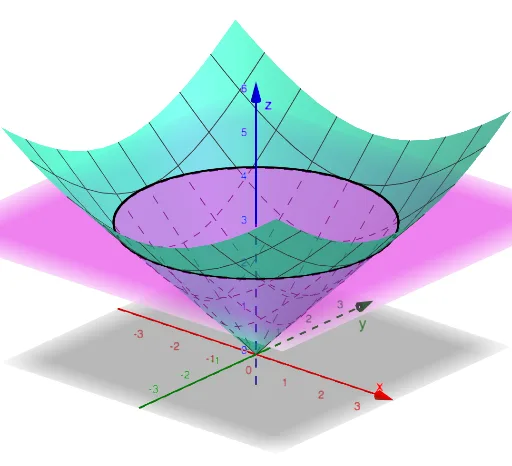
① This example uses the GeoGebra 3D app to visually demonstrate how a plane intersecting a cone produces the four basic conic sections: circle, ellipse, parabola, and hyperbola, offering a three-dimensional perspective on these classic two-dimensional curves. ② Core mathematical concepts include the definition of conic sections, the geometric relationship between a plane and a cone, and how varying the plane's tilt changes the resulting curve type, bridging solid geometry and coordinate geometry. ③ Construction highlights: the GeoGebra command IntersectPath is applied to the objects Cone, Plane, and parameter a, generating the intersection path between the plane and the cone, allowing dynamic exploration of different cross-sectional curves. ④ This is suitable for high school or early college students as an introductory demonstration for conic sections, and for mathematics teachers seeking an interactive classroom visualization to enhance spatial reasoning and curve classification.
GeoGebra Commands & Parameters
IntersectPath(Plane, Cone) → a
AI Drawing Prompt Reference
Draw a three-dimensional cone and a plane intersecting it. Tilt the plane at various angles to produce different intersection curves: a circle when the plane is horizontal, an ellipse when slightly tilted, a parabola when parallel to a cone's side, and a hyperbola when tilted more steeply. Highlight the intersection curve between the plane and the cone, and show how the curve shape changes continuously as the plane's angle varies. The scene should clearly illustrate the geometric relationship between the plane and the cone, aiding in the classification of conic sections.
The prompt above was compiled from the original drawing commands and is for reference only.