
Rational Numbers on a Number Line: Interactive Visualization
Loading the math board and drawing, please wait…
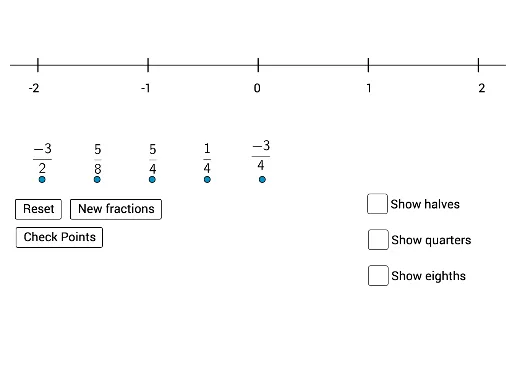
① This GeoGebra example constructs a number line and dynamically displays the positions of rational numbers, allowing learners to intuitively grasp the density and ordering of rational numbers. ② Core mathematical concepts include rational numbers, fractions, number lines, comparison of numbers, and relationships between rationals and integers, with extensions to percentages and logarithmic functions. ③ Construction highlights: uses Sequence command to generate sequences, Segment command to draw number line segments; objects include multiple lists (list1 to list8), sliders (n, p), buttons (button1, button2), and texts (text6, text7), enabling dynamic adjustment of parameters to show different rational numbers and their errors (error), with feedback mechanisms for values too large (toobig) or too small (toosmall). ④ Suitable for middle school to high school students learning rational numbers, and useful for classroom demonstrations or self-paced exploration, deepening understanding of how rational numbers distribute on the number line.
GeoGebra Commands & Parameters
Sequence(RandomElement[dens], i, 1, 5) → list6_1Sequence(Random[(-2 * Element[list6_1, i]), (2 * Element[list6_1, i])], i, 1, 5) → list7_1Sequence(Element[list7, i] / Element[list6, i], i, 1, 5) → flistSequence((-x(Element[list8, i])) + Element[flist, i] > error, i, 1, 5) → toosmallSequence(x(Element[list8, i]) - Element[flist, i] > error, i, 1, 5) → toobigSegment(A, B) → f_1Sequence(Segment[(-2 + i, -0.12), (-2 + i, 0.12)], i, 0, 4, 1) → list1Sequence(Text[-2 + i, (x(C) + (1.02 * i), y(C))], i, 0, 4) → list2Sequence(Segment[(-2 + i, -0.11), (-2 + i, 0.11)], i, 0, 4, 0.5) → list3Sequence(Segment[(-2 + i, -0.09), (-2 + i, 0.09)], i, 0, 4, 0.25) → list4Sequence(Segment[(-2 + i, -0.07), (-2 + i, 0.07)], i, 0, 4, 0.125) → list5
AI Drawing Prompt Reference
Draw a number line and mark 5 random rational numbers. Use a slider to adjust the range of the rational numbers and display them as fractions. Indicate each number's position on the line with small segments and label each number with text. Set an error range and show a message indicating the number is too large or too small if it exceeds the range.
The prompt above was compiled from the original drawing commands and is for reference only.