
Intersections of Lines and Fractal Triangle Exploration
Loading the math board and drawing, please wait…
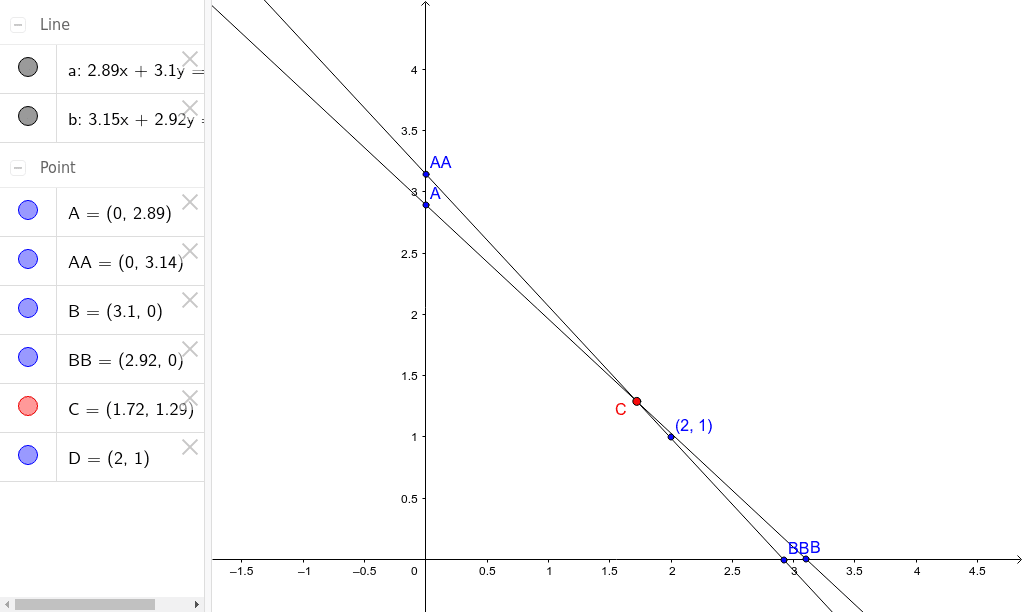
①This example demonstrates how to construct triangles using intersections of two lines and generate complex geometric patterns through iteration or fractal-like processes. ②Core mathematical concepts include linear equations, solving intersections, basic properties of triangles, and self-similarity in fractal geometry, along with the geometric interpretation of linear systems. ③Construction highlights: Based on the summary, the GeoGebra commands Line and Intersect are used to create lines a and b, and to find intersection points C and D. Points A, B, AA, BB are employed to build triangles and subsequent fractal levels, showcasing the interplay between lines and points. ④Suitable for upper secondary or early university students to understand intersection computation in coordinate geometry and to explore fractal geometry as an introduction, also useful for math lab sessions or advanced GeoGebra practice.
GeoGebra Commands & Parameters
Line(A, B) → aLine(AA, BB) → bIntersect(a, b) → C
AI Drawing Prompt Reference
Create a triangular fractal exploration graphic constructed through line intersections. Begin by drawing two intersecting lines, with their intersection point serving as one vertex of a triangle. Then use this intersection point along with two other points to construct the initial triangle. Apply iteration or recursion to this triangle to generate subdivided child triangles, forming a self-similar fractal-like structure. The graphic should demonstrate the interaction between lines and points, illustrating the geometric interpretation of linear equations and basic triangle properties.
The prompt above was compiled from the original drawing commands and is for reference only.