
Intersection of Two Lines by rasheedgadir
Loading the math board and drawing, please wait…
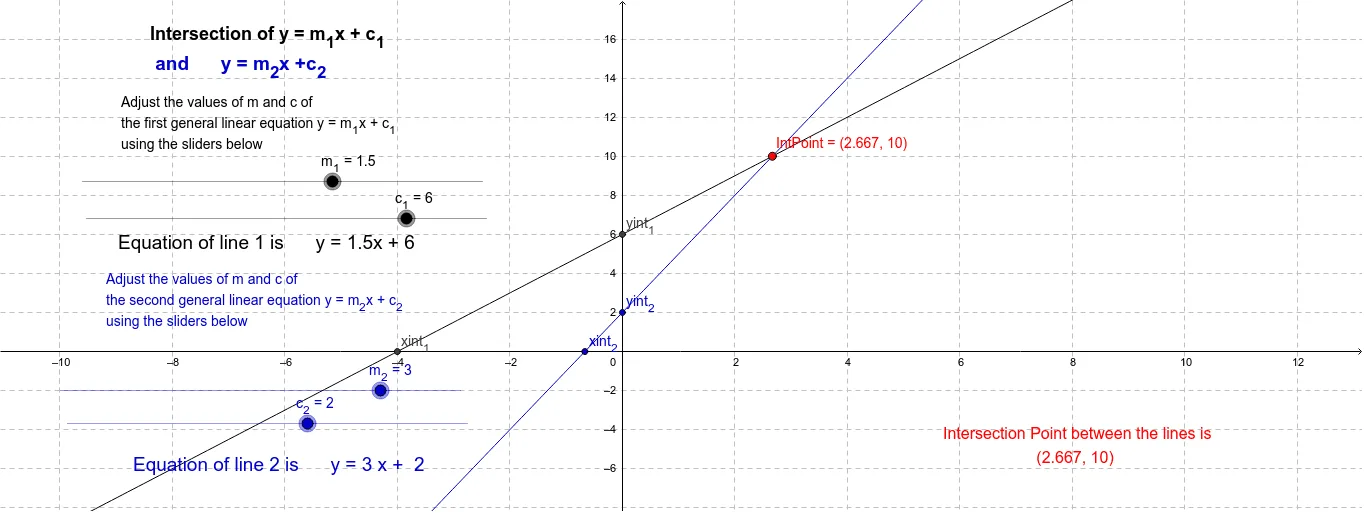
This example demonstrates the intersection of two straight lines by calculating and visualizing the intersection point from their given equations. Core mathematical concepts include coordinate geometry, line equations, and intersection point calculation. Key GeoGebra commands/objects used are Intersect (to find intersection points), parameters m_1, c_1, m_2, c_2 (for lines), yint_1, yint_2, xint_1, xint_2 (for intercepts and coordinates), and text elements (for annotations). Suitable for high school students learning about line equations and intersection calculations, as well as for educational demonstrations.
GeoGebra Commands & Parameters
Intersect(f, yAxis) → yint_1Intersect(f, xAxis) → xint_1Intersect(g, yAxis) → yint_2Intersect(g, xAxis) → xint_2Intersect(g, f) → IntPoint
AI Drawing Prompt Reference
Draw two straight lines on a coordinate plane, each defined by its slope and intercept. Mark where each line crosses the y-axis and the x-axis. Show the point where the two lines intersect, and label it. Add text annotations displaying the equation of each line and the coordinates of the intersection point. The figure should clearly illustrate the geometric relationship of two intersecting lines with their intercepts and intersection point.
The prompt above was compiled from the original drawing commands and is for reference only.