
Intersection of Two Cylinders: Constructing Spatial Curves via Mirror and Orthog
Loading the math board and drawing, please wait…
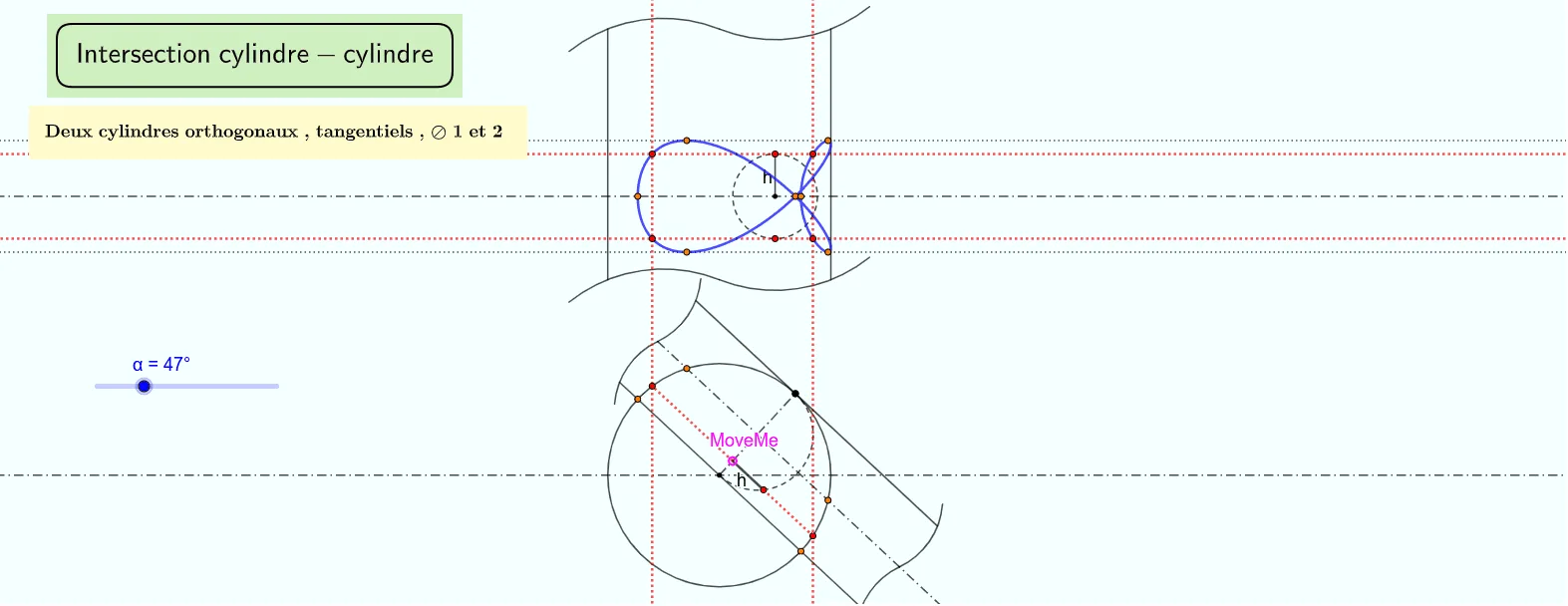
This example demonstrates how the intersection line (the common curve) of two cylinders in 3D space can be constructed and visualized precisely. It focuses on solid-geometry ideas such as the intersection of two surfaces, the geometric meaning of a “set intersection,” and the use of symmetry and orthogonality to obtain reliable auxiliary constructions. The construction leverages GeoGebra commands like Intersect to compute intersection objects, Circle to define circular cross-sections or reference curves, Mirror for symmetric placement, and OrthogonalLine to enforce perpendicular constraints. It also uses Point, Line, Segment, Ray, and Midpoint for building the skeleton of the construction, along with Rotate when a rotated configuration is needed; Locus and Semicircle help organize curve relationships and boundary pieces. Suitable for advanced middle school, high school, and early university solid geometry classes, as well as for interactive math visualization and modeling practice.
GeoGebra Commands & Parameters
Intersect(xAxis, yAxis) → ACircle(A, 1) → cIntersect(c, xAxis) → B, CMirror(C, B) → C'OrthogonalLine(C', xAxis) → fOrthogonalLine(C, xAxis) → gOrthogonalLine(B, xAxis) → h_{2}Point(h_{2}) → DOrthogonalLine(D, h_{2}) → iIntersect(f, i) → ECircle(D, E) → dIntersect(i, g) → FRotate(F, α, D) → F'Ray(D, F') → jOrthogonalLine(F', j) → kOrthogonalLine(D, j) → lIntersect(d, l, 2) → GOrthogonalLine(G, i) → mIntersect(c, yAxis) → H, IIntersect(m, xAxis) → JMidpoint(D, F') → KOrthogonalLine(K, j) → nIntersect(d, n) → L, MOrthogonalLine(M, i) → pOrthogonalLine(L, i) → qOrthogonalLine(I, yAxis) → rOrthogonalLine(H, yAxis) → sOrthogonalLine(F', i) → tIntersect(t, xAxis) → NIntersect(p, r) → OIntersect(q, s) → POrthogonalLine(K, i) → f_1OrthogonalLine(D, i) → g_1Intersect(d, l, 1) → UOrthogonalLine(U, i) → h_1Intersect(xAxis, h_1) → VIntersect(q, r) → WIntersect(p, s) → ZSegment(D, F') → i_1Point(i_1) → SLine(S, n) → j_1Intersect(d, j_1) → T, A_1Line(A_1, yAxis) → r_1Semicircle(F', D) → c_1Intersect(c_1, j_1, 1) → F_1Segment(S, F_1) → hCircle(A, h) → d_1Intersect(d_1, yAxis) → G_1, H_1OrthogonalLine(H_1, yAxis) → s_1OrthogonalLine(G_1, yAxis) → t_1Intersect(r_1, s_1) → I_1Intersect(r_1, t_1) → J_1Locus(I_1, S) → lieu1Locus(J_1, S) → lieu2OrthogonalLine(T, i) → a_1Intersect(a_1, s_1) → K_1Intersect(t_1, a_1) → L_1Locus(K_1, S) → lieu3Locus(L_1, S) → lieu4Segment(A, H_1) → aPoint(l) → QPoint(l) → ROrthogonalLine(R, l) → bOrthogonalLine(Q, l) → k_1Intersect(k, k_1) → B_1Intersect(k, b) → C_1Segment(B_1, C_1) → l_1Segment(Q, R) → m_1Intersect(c_1, l_1, 1) → D_1Intersect(d, i) → M_1, N_1OrthogonalLine(M_1, i) → n_1OrthogonalLine(N_1, i) → q_1Point(n_1) → P_1Point(n_1) → Q_1OrthogonalLine(P_1, n_1) → b_1OrthogonalLine(Q_1, n_1) → e_1Segment(Q_1, P_1) → f_2Line(J, A) → i_2Segment(S, A_1) → j_2Intersect(n, k_1) → W_1Ray(W_1, M) → k_2Intersect(g, b_1) → Z_1Intersect(g, e_1) → A_2Segment(A_2, Z_1) → g_2OrthogonalLine(T, i_2) → l_2Segment(F_1, T) → m_2Vague(Q_1, A_2) → p_1, c_2Vague(Q, B_1) → d_2, e_2Vague(R, C_1) → p_2, q_2Vague(P_1, Z_1) → r_2, s_2
AI Drawing Prompt Reference
Draw the intersection curve of two cylinders in 3D space. Use symmetry and orthogonality to assist in locating the curve. The figure includes circles, points, lines, rays, and other elements. First, define circles on the coordinate axes. Then, use symmetry to get symmetric points. Next, construct auxiliary lines using orthogonal lines. Finally, determine the curve's position using these auxiliary lines. Add some auxiliary points, rays, and semicircles to complete the figure, making the construction process clear.
The prompt above was compiled from the original drawing commands and is for reference only.