
Intersection of Normals on Hyperbola
Loading the math board and drawing, please wait…
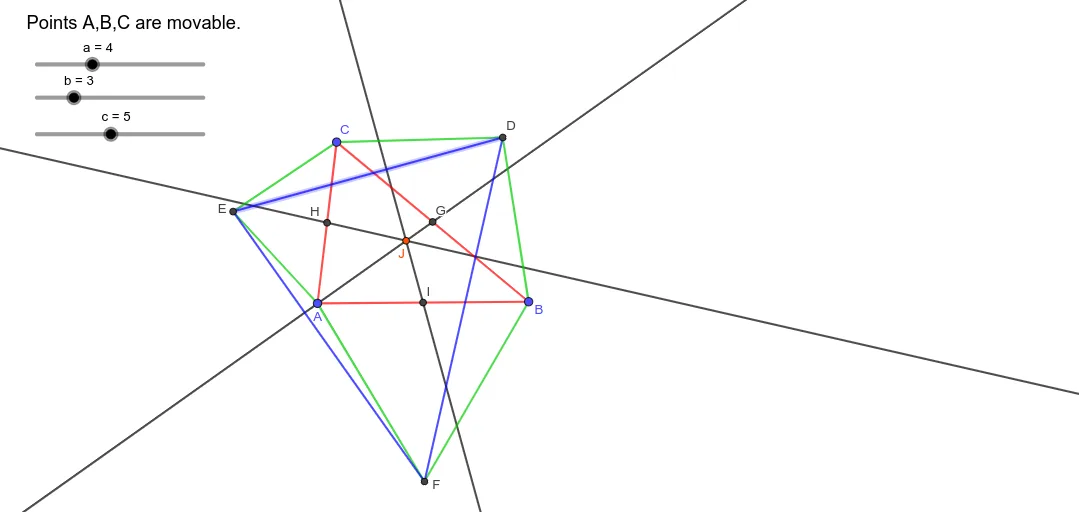
This example demonstrates the intersection point of normals on a hyperbola. The key mathematical concepts include the geometric properties of hyperbolas, the definition of normals, and intersection calculations in coordinate geometry. Construction involves GeoGebra commands such as Polygon, Circle, Intersect, Midpoint, Segment, and OrthogonalLine to create the hyperbola, determine normals, calculate midpoints, and find intersection points. Suitable for high school students or college undergraduates learning analytic geometry and function graphing.
GeoGebra Commands & Parameters
Polygon(A, B, C) → t1, c_{3}, a_{3}, b_{3}Circle(B, a) → dCircle(C, a) → eIntersect(d, e, 2) → DPolygon(B, D, C) → t2, c_1, b_1, d_1Circle(C, b) → fCircle(A, b) → gIntersect(f, g, 2) → EPolygon(C, E, A) → t3, a_1, c_2, e_1Circle(B, c) → hCircle(A, c) → kIntersect(h, k, 1) → FPolygon(A, F, B) → t4, b_2, a_2, f_1Midpoint(C, B) → GMidpoint(C, A) → HMidpoint(A, B) → ISegment(E, D) → iSegment(E, F) → jSegment(D, F) → lOrthogonalLine(I, i) → mOrthogonalLine(H, l) → nOrthogonalLine(G, j) → pIntersect(m, n) → J
AI Drawing Prompt Reference
Draw a hyperbola and show the intersection points of its normals. Start by sketching the hyperbola, then draw circles centered at points on the hyperbola and at midpoints of its axes. Find the intersections of these circles. Connect the intersection points to form triangles, and use these triangles to draw additional lines and circles. Finally, locate the intersection points of the normals and clearly mark them.
The prompt above was compiled from the original drawing commands and is for reference only.