
Visualizing Four Concyclic Triangle Centers
Loading the math board and drawing, please wait…
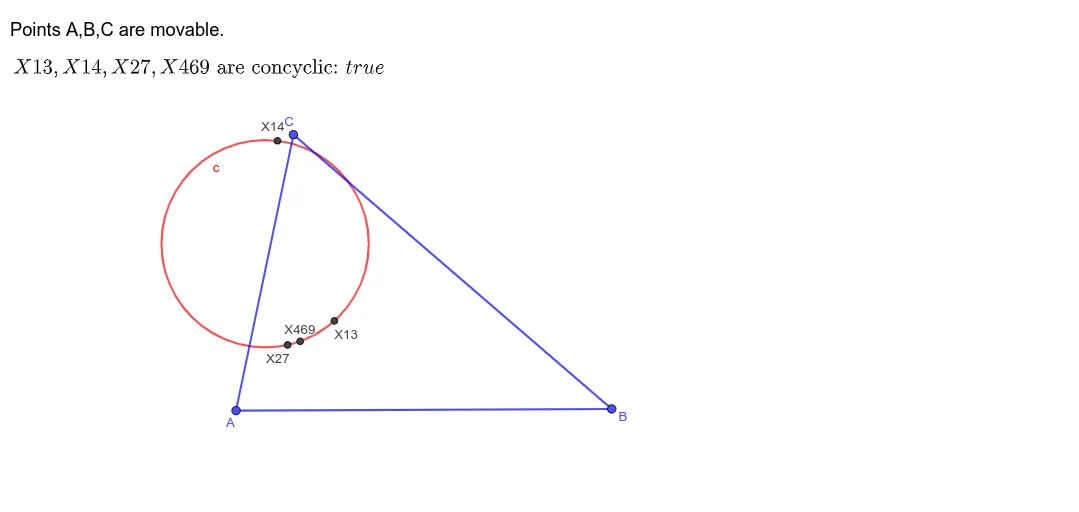
This example constructs a triangle ABC and studies how several classic triangle centers relate to a circle as the configuration varies. It demonstrates a concyclicity phenomenon: specific triangle-center points lie on a common circle under the given construction and parameter choices. The key concepts are triangle centers, concyclic points (concyclicity), and the geometric relationship between a triangle’s notable points and circles. From the GeoGebra construction summary, Polygon is used to draw triangle ABC; TriangleCenter generates multiple center points (e.g., t1, X27, X13, X14, X469); Circle builds the reference circle (e.g., c1, c); and AreConcyclic checks/validates concyclicity, with supporting objects such as e and text labels (text1, text2) to present the result. Suitable for advanced secondary students, contest preparation, and interactive geometry lessons focused on verifying geometric properties with dynamic geometry tools.
GeoGebra Commands & Parameters
Polygon(A, B, C) → t1, c_{1}, a, bTriangleCenter(A, B, C, 27) → X27TriangleCenter(A, B, C, 13) → X13TriangleCenter(A, B, C, 14) → X14TriangleCenter(A, B, C, 469) → X469Circle(X27, X13, X14) → cAreConcyclic(X27, X13, X14, X469) → e
AI Drawing Prompt Reference
Draw a triangle and mark several of its classic centers, then form a circle using three of these centers and check if the fourth one lies on the same circle, demonstrating the concyclicity phenomenon with text annotations.
The prompt above was compiled from the original drawing commands and is for reference only.