
Interior and Exterior Angles of a Pentagon
Loading the math board and drawing, please wait…
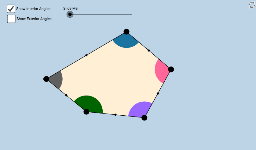
This example demonstrates the calculation and properties of interior and exterior angles in a pentagon, covering core math concepts like polygon angle sum formulas and exterior angle theorems. It utilizes GeoGebra commands and objects such as Segment, Midpoint, Ray, Circle, Intersect, CircleSector, Vector, Translate, Mirror, Dilate, Rotate, Line, If, Point, Polygon, CircleArc as outlined in the construction summary. Ideal for middle school and above, helping students visualize polygon angle relationships and geometric transformations.
GeoGebra Commands & Parameters
Segment(D, E) → i_3Midpoint(i_3) → M_3Ray(A, B) → aRay(B, C) → bRay(C, D) → cRay(D, E) → dRay(E, A) → eCircle(A, 1.5) → fCircle(B, 1.5) → gCircle(C, 1.5) → hCircle(D, 1.5) → kCircle(E, 1.5) → pSegment(C, A) → iSegment(C, E) → jIntersect(f, a, 1) → FIntersect(f, i, 1) → GIntersect(f, e, 1) → HIntersect(f, e, 2) → IIntersect(p, e) → J,Intersect(p, j) → K,Intersect(p, d, 1) → LIntersect(p, d, 2) → MIntersect(k, d, 1) → NIntersect(k, c, 2) → OIntersect(h, c, 1) → PIntersect(h, j, 1) → QIntersect(h, i, 1) → RIntersect(h, b, 1) → SIntersect(g, a, 2) → TIntersect(g, b, 1) → UIntersect(g, a, 1) → VCircleSector(A, F, G) → qCircleSector(A, G, H) → rCircleSector(B, U, V) → sCircleSector(C, P, Q) → tCircleSector(C, Q, R) → c_1CircleSector(C, R, S) → d_1Intersect(k, c, 1) → WCircleSector(D, O, N) → e_1CircleSector(D, N, W) → f_1CircleSector(E, M, J) → g_1CircleSector(E, J, K) → h_1CircleSector(E, K, L) → k_1CircleSector(A, I, F) → p_1CircleSector(B, T, U) → q_1Intersect(h, b, 2) → ZCircleSector(C, Z, P) → r_1Vector(A, B) → uVector(C, B) → vVector(E, D) → wVector(C, D) → u_1Vector(C, E) → v_1Vector(A, E) → w_1Translate(d_1, v) → s_1Mirror(s_1, B) → t_1Dilate(A, If[0 < l ≤ 1, 1 - l, 0], B) → A'Dilate(C, If[0 < l ≤ 1, 1 - l, 0], B) → C'Dilate(A, If[1 < l ≤ 2, 2 - l, 0], E) → A'_1Dilate(C, If[1 < l ≤ 2, 2 - l, 0], E) → C'_1Dilate(C, If[2 < l ≤ 3, 3 - l, 0], D) → C'_2Vector(A, B) → a_1Vector(C, C') → b_1Vector(A, A'_1) → i_1Rotate(E, If[2 < l ≤ 3, (((-(l - 2)) * 180))°, -180°], M_3) → E'Vector(E, E') → j_1Vector(C, C'_2) → l_1Vector(C, C'_1) → m_1Translate(d_1, b_1) → c_2Translate(r, i_1) → r'_1Translate(r, w_1) → r'_2Translate(k_1, w) → d_2Translate(k_1, j_1) → e_2Translate(c_1, v_1) → f_2Translate(c_1, m_1) → g_2Translate(t, u_1) → t'Translate(t, l_1) → t'_1Translate(q, a_1) → r'Translate(d_1, b_1) → h_2Vector(A, A') → n_1Line(E, C) → a_2Line(E, D) → b_2Segment(E, C) → i_2Vector(D, C) → u_2Vector(E, C) → v_2Vector(A, C) → w_2Vector(B, C) → l_2Dilate(B, If[0 < o < 1, 1 - o, 0], C) → B'Dilate(A, If[1 < o < 2, 2 - o, 0], C) → A'_2Dilate(E, If[2 < o < 3, 3 - o, 0], C) → E'_1Dilate(D, If[3 < o < 4, 4 - o, 0], C) → D'Vector(B, B') → m_2Vector(A, A'_2) → n_2Vector(E, E'_1) → s_2Vector(D, D') → t_2Translate(q_1, m_2) → c_3Translate(q_1, l_2) → d_3Translate(p_1, w_2) → e_3Translate(g_1, v_2) → f_3Translate(e_1, u_2) → g_3If(1 < o < 2, Translate[p_1, n_2]) → h_3If(2 < o < 3, Translate[g_1, s_2]) → k_3If(3 < o < 4, Translate[e_1, t_2]) → p_3Point(a_2) → A_1Point(a_2) → B_1Ray(C, B_1) → a_3Ray(E, A_1) → b_3Polygon(A, B, C, D, E) → poly1, a_4, b_4, c_4, d_4, e_4Polygon(A, B, C) → poly2, c_5, a_5, b_5Polygon(A, C, E) → poly3, e_5, a_6, c_6Polygon(E, C, D) → poly4, d_5, e_6, c_7Segment(E, A) → j_3Segment(A, B) → l_3Segment(B, C) → m_3Segment(C, D) → n_3Midpoint(j_3) → M_4Midpoint(l_3) → M_5Midpoint(m_3) → M_1Midpoint(n_3) → M_2Rotate(d_1, If[0 < l ≤ 1, (((-l) * 180))°, -180°], M_1) → k_2Rotate(C, If[0 < l ≤ 1, (((-l) * 180))°, -180°], M_1) → C'_3Segment(M_1, C'_3) → q_3Rotate(q, If[0 < l ≤ 1, ((l * 180))°, 180°], M_5) → q'Rotate(A, If[0 < l ≤ 1, ((l * 180))°, 180°], M_5) → A'_3Rotate(R, 180°, M_1) → R'Line(B, R') → s_3Segment(M_5, A'_3) → r_3Rotate(r, If[1 < l ≤ 2, (((-(l - 1)) * 180))°, -180°], M_4) → r'_3Rotate(A, If[1 < l ≤ 2, (((-(l - 1)) * 180))°, -180°], M_4) → A'_4Segment(M_4, A'_4) → p_2Rotate(t, If[2 < l ≤ 3, (((l - 2) * 180))°, 180°], M_2) → t'_2Rotate(C, If[2 < l ≤ 3, (((l - 2) * 180))°, 180°], M_2) → C'_4Segment(M_2, C'_4) → q_2Vector(E, D) → j_2Translate(L, j_2) → L'Ray(D, L') → r_2CircleArc(C, R, S) → t_3CircleArc(C, Q, R) → f_4CircleArc(C, P, Q) → g_4CircleArc(A, F, G) → h_4CircleArc(A, G, H) → k_4CircleArc(E, K, L) → p_4Segment(M_3, E') → i_4
AI Drawing Prompt Reference
Draw a pentagon and display its interior and exterior angles. Start by drawing the five sides of the pentagon, then extend rays from each vertex. Center circles with radius 1.5 at each vertex and find the intersection points of the rays with these circles. Use sectors to represent each interior and exterior angle, clearly showing the size relationships between them.
The prompt above was compiled from the original drawing commands and is for reference only.