
Interior and Exterior Angles in Regular Polygons by Paul Smith
Loading the math board and drawing, please wait…
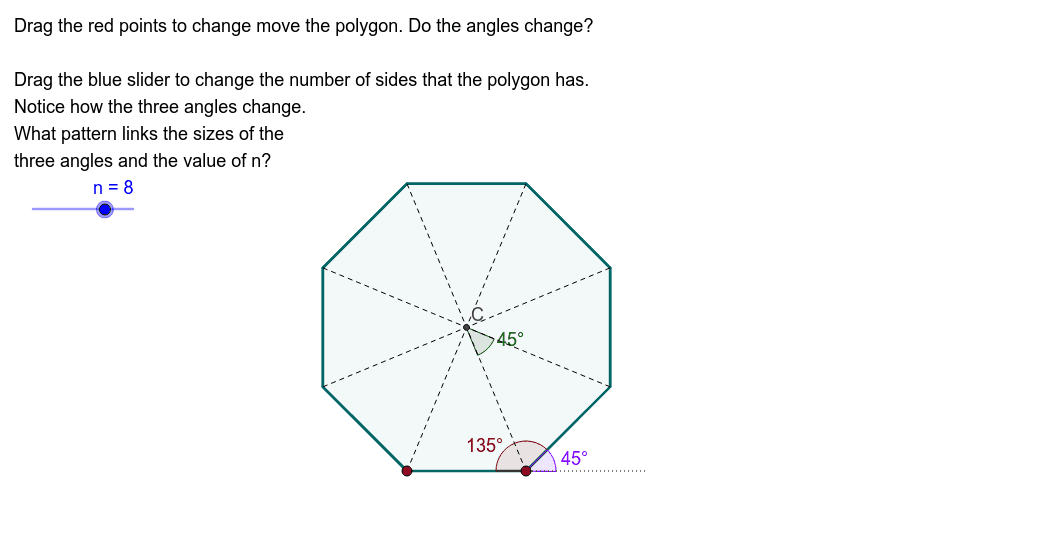
This example demonstrates generating various regular polygons by adjusting the number of sides and observing how the interior and exterior angles change. Key math concepts include polygons, interior angles, exterior angles, and geometric construction. It uses GeoGebra commands like Polygon, Angle, Vector, Segment, LineBisector, and Intersect. Suitable for middle school and above students to visually understand the geometric properties and angle relationships of regular polygons.
GeoGebra Commands & Parameters
Polygon(A, B, n) → poly1, a_1, i, j, k, C_1, D, E, F, G, H, I, b, J, K, L, c, d, e, a, f, g, hAngle((4.380000000000001, 2.02), C_1, B) → λAngle(C_1, B, A) → μVector(A, B) → uSegment(M, B) → lAngle(M, B, C_1) → αLineBisector(A, B) → mLineBisector(B, C_1) → pIntersect(p, m) → CSegment(A, C) → qSegment(B, C) → rSegment(C_1, C) → sSegment(D, C) → tSegment(E, C) → b_1Segment(F, C) → c_1Segment(G, C) → d_1Segment(H, C) → e_1Segment(I, C) → f_1Segment(J, C) → g_1Angle(B, C, C_1) → β
AI Drawing Prompt Reference
Draw a regular polygon with adjustable number of sides. Start with two adjacent vertices, then generate the remaining vertices and connect them to form the polygon. Mark one interior angle and its corresponding exterior angle. Construct perpendicular bisectors of two adjacent sides; their intersection is the center. Connect the center to all vertices, creating several isosceles triangles. Finally, mark an angle at the center to show the relationship between interior, exterior, and central angles.
The prompt above was compiled from the original drawing commands and is for reference only.