
Interesting Triangles Phenomenon: A Visual Exploration of Rotation and Fractal G
Loading the math board and drawing, please wait…
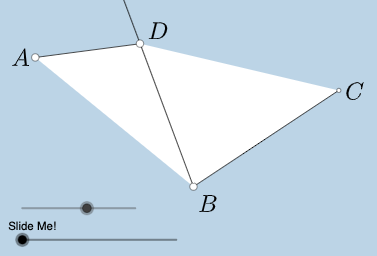
① This example demonstrates a network of triangles generated through rotations, translations, and dilations, producing a self-similar fractal-like pattern with dynamic angle and line relationships. ② Core mathematical concepts include triangles, angles, tangent function, straight lines, general quadrilaterals, plane figures, and fractal geometry's self-similarity, involving geometric transformations such as rotation, translation, and scaling. ③ Construction highlights: From the construction summary, the GeoGebra commands used include Rotate, Angle, Ray, Point, Segment, Circle, Intersect, Midpoint, Min, Polygon, CircleSector, Semicircle, Vector, Translate, Line, CircleArc, and Dilate, with numerous objects (points like A, B, C, D, E, F; angles α, β, γ, δ; lines, circles, polygons, and auxiliary elements) to build the complex figure. ④ Suitable for upper secondary to early university students, this is ideal for exploring geometric transformations, introductory fractal geometry, dynamic geometry investigations, and as a resource for mathematical art or teacher demonstrations, illustrating how combined transformations yield intricate patterns.
GeoGebra Commands & Parameters
Rotate(A, (a * π / 180), B) → A'Angle(A, B, A') → αRay(B, A') → gPoint(g) → CSegment(A, C) → jCircle(B, j) → dRotate(B, (-(π - α)), C) → B'Ray(C, B') → hIntersect(d, h, 1) → DMidpoint(A, D) → NSegment(A, B) → fAngle(B', C, B) → γSegment(B, D) → iAngle(C, A, B) → βAngle(B, D, C) → δRay(C, B) → kMin({f, j, i, Distance[C, D]}) → bCircle(B, (0.25 * b)) → cCircle(A, (0.25 * b)) → ePolygon(A, C, D, B) → q1, a_1, c_1, d_1, b_1Segment(C, D) → mIntersect(c, f, 1) → ERotate(E, If[0 < l ≤ 1, ((-l) * γ), (-γ)], B) → E'CircleSector(B, E', E) → pSemicircle(B, C) → qMidpoint(C, B) → FRotate(B, If[2 < l ≤ 3, ((-(l - 2)) * π), (-π)], F) → B'_{1}Vector(B, B'_{1}) → uTranslate(p, u) → p'Line(B, m) → nRotate(p', If[2 < l ≤ 3, ((-(l - 2)) * γ), (-γ)], B'_{1}) → p''Circle(B, E) → rIntersect(r, k) → G, HCircleArc(B, H, E) → sDilate(A, If[3 < l ≤ 4, 4 - l, 0], C) → A'_{1}Vector(A, A'_{1}) → vSegment(A, A'_{1}) → tDilate(C, If[4 < l ≤ 5, 5 - l, 0], D) → C'Vector(C, C') → wTranslate(A, w) → A'_{2}Translate(A'_{1}, w) → ISegment(A'_{2}, I) → t'Line(B, D) → f_1Line(C, f_1) → g_1Point(g_1) → JAngle(A, C, J) → εRotate(A'_{2}, If[4 < l ≤ 5, ((l - 4) * ε), ε], C') → KRotate(I, If[4 < l ≤ 5, ((l - 4) * ε), ε], C') → I'Segment(K, I') → t''Intersect(e, Segment[A, C]) → L,Rotate(L, If[6 < l ≤ 7, ((l - 6) * β), β], A) → L'CircleSector(A, L, L') → e_1Dilate(A, If[8 < l ≤ 9, 9 - l, 0], N) → A'_{3}Vector(A, A'_{3}) → u_1Translate(e_1, u_1) → h_1Intersect(e, f, 1) → MLine(N, t'') → i_1Line(A, t'') → j_1Point(j_1) → OAngle(O, A, C) → ζRotate(h_1, If[9 < l ≤ 10, ((-(l - 9)) * ζ), (-ζ)], N) → k_1Dilate(N, If[10 < l ≤ 11, 11 - l, 0], D) → N'Vector(N, N') → v_1Translate(k_1, v_1) → p_1Rotate(E, (a / 2 * π / 180), B) → E'_{1}
AI Drawing Prompt Reference
Create a self-similar fractal-like pattern formed by rotations and translations: start with a horizontal segment AB, rotate point A around B to create a new point, draw a ray through it and select point C on the ray, then connect AC. Draw a circle centered at B with radius AC, rotate point B around C to get point B', draw ray from C through B' and find intersection D with the circle. Take midpoint N of A and D, connect AB, AC, BD, and CD to form a quadrilateral. Select point E on AB, draw circles centered at B and A with radius one-fourth of AB. Create a circular sector starting from E, find midpoint F of BC, perform transformations around F. Translate the pattern along a specific vector, draw line through B and D, select point J on it, connect A, C, and J to form an angle. Apply multiple rotations and translations to the relevant points, generating layered similar geometric figures that form a complex fractal network.
The prompt above was compiled from the original drawing commands and is for reference only.