
Interactive Unit Circle in Radians with a Slider
Loading the math board and drawing, please wait…
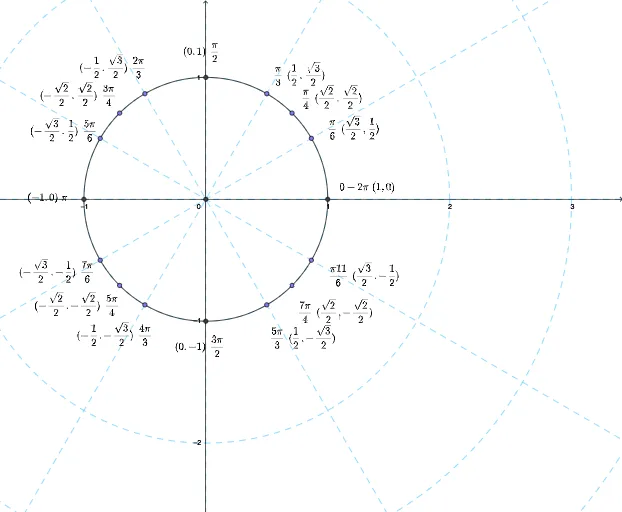
This example visualizes the unit circle (radius 1) with a slider that continuously changes the angle in radians, showing how the corresponding point on the circle moves and how related geometric constructions evolve. It centers on key concepts: the unit circle, radian measure, and the coordinate interpretation of cosine and sine as the x- and y-coordinates of the rotating point. The construction is built using core GeoGebra commands such as Intersect, Circle, Point, Segment, and OrthogonalLine to create the circle, key points on the circumference, and auxiliary segments/orthogonal lines that link the angle parameter to measurable geometric relationships. The scene includes intersection-generated objects and labeled elements (text objects) to make the evolving configuration easy to read. Suitable for secondary to early university levels, especially for learning trigonometry, radian-angle interpretation, and interactive geometry demonstrations.
GeoGebra Commands & Parameters
Intersect(xAxis, yAxis) → ACircle(A, 1) → cPoint(c) → BPoint(c) → CPoint(c) → DIntersect(c, yAxis, 2) → EPoint(c) → FPoint(c) → GPoint(c) → HIntersect(c, xAxis, 1) → IPoint(c) → JPoint(c) → KPoint(c) → LIntersect(c, yAxis, 1) → MIntersect(c, xAxis, 2) → QPoint(c) → OPoint(c) → NPoint(c) → PSegment(A, R) → aOrthogonalLine(R, xAxis) → bIntersect(b, xAxis) → SSegment(R, S) → dSegment(A, S) → e
AI Drawing Prompt Reference
Draw a unit circle with radius 1 and mark four points B, C, D, and F on the circumference. Use a slider to represent the angle and dynamically generate points E, G, H, I, J, K, L, M, and Q. Connect the center O to point R, draw a tangent and perpendicular line from R to the x-axis, generate point S, and connect points R and S, as well as A and S.
The prompt above was compiled from the original drawing commands and is for reference only.