
Interactive Unit Circle for the Complex Number z
Loading the math board and drawing, please wait…
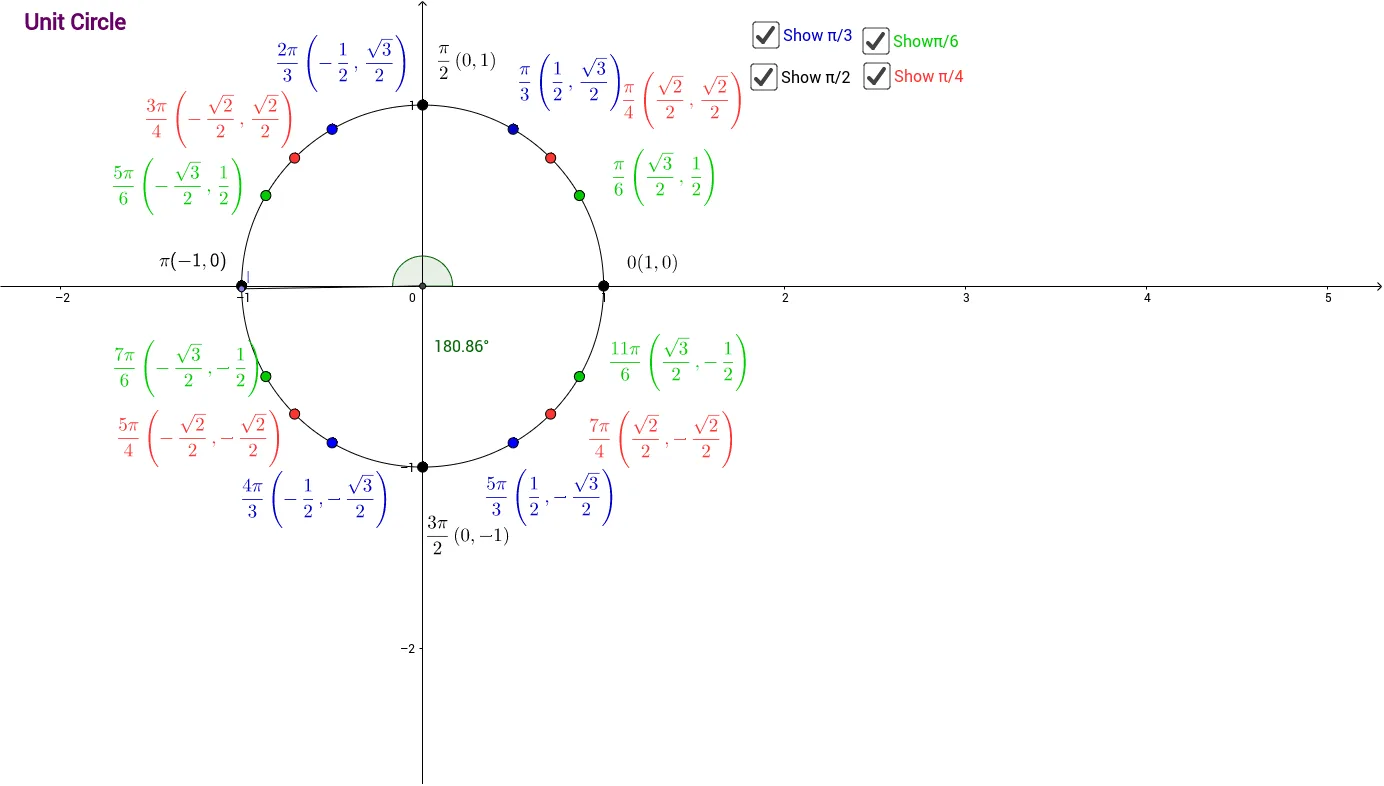
This example uses interactive construction to demonstrate the relationship between points on the unit circle and the complex number z. By moving a point along the unit circle, the associated angle and coordinate components update dynamically, showing how geometric position corresponds to trigonometric values and complex representation. Key concepts include the unit circle, parameter angle (θ), trigonometric functions (sin/cos), and the geometric meaning of complex numbers when the modulus is 1. Construction highlights: Intersect is used to compute intersection points between the circle and auxiliary objects; Circle constructs the unit circle; Point and Segment create the moving point on the circumference and the connecting segments used for visualization; Mirror builds symmetric auxiliary points to reveal the angle-related structure; and Angle labels the critical angle measures. Text objects (text1–text17) are used to present evolving quantities and labels. Suitable for high school through early university, for lessons on complex numbers, trigonometry, and dynamic geometry visualization.
GeoGebra Commands & Parameters
Intersect(xAxis, yAxis) → ACircle(A, 1) → cMirror(B, yAxis) → B'Mirror(B, xAxis) → B'_1Mirror(B', xAxis) → B''Mirror(C, yAxis) → C'Mirror(C', xAxis) → C''Mirror(C'', yAxis) → C'''Mirror(D, yAxis) → D'Mirror(D', xAxis) → D''Mirror(D'', yAxis) → D'''Point(c) → ISegment(I, A) → gAngle(E, A, I) → α
AI Drawing Prompt Reference
Draw a unit circle with a movable point on its circumference. As the point moves, the angle and coordinate values update dynamically. Include symmetric auxiliary points to show angle-related structures. Labels should display current angle and coordinate values, suitable for dynamic geometry visualization in learning complex numbers and trigonometry.
The prompt above was compiled from the original drawing commands and is for reference only.