
Interactive Triangle Congruence Exploration
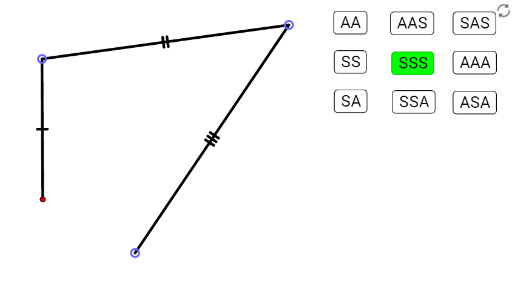
Loading the math board and drawing, please wait…
This GeoGebra interactive applet allows users to explore triangle congruence by fixing side lengths and angles, dynamically demonstrating conditions such as SSS, SAS, ASA, and AAS. Core mathematical concepts include triangle congruence criteria, geometric constraints, and angle-side relationships. Construction uses GeoGebra commands like Point, Segment, Polygon, Intersect, Angle, and Ray, with geometric objects such as AB, BC, CA, angA, angB, angC. Ideal for middle and high school geometry classes, it helps students visualize and understand the necessity and sufficiency of congruence conditions through hands-on manipulation.
GeoGebra Commands & Parameters
Point(Circle[A_{SS}, AB]) → B_{SS}Point(Circle[B_{SS}, BC]) → C_{SS}Polygon(A_{SS}, B_{SS}, C_{SS}) → tri_{SS}, c_{ss}, a_{ss}, b_{ss}Point(Circle[A_{SA}, AB]) → B_{SA}Point(Ray[Rotate[B_{SA}, (-angB), B_{SA}], Rotate[A_{SA}, angB, B_{SA}]]) → C_{SA}Polygon(A_{SA}, B_{SA}, C_{SA}) → tri_{SA}, c_{sa}, a_{sa}, b_{sa}Point(Circle[A_{SSS}, AB]) → B_{SSS}Point(Circle[B_{SSS}, BC]) → C_{SSS}Point(Circle[C_{SSS}, CA]) → AC_{SSS}Segment(A_{SSS}, B_{SSS}) → aSegment(B_{SSS}, C_{SSS}) → bSegment(C_{SSS}, AC_{SSS}) → cPolygon(A_{SSS}, B_{SSS}, C_{SSS}) → tri_{SSS}, c_{sss}, a_{sss}, b_{sss}Point(Circle[A_{SSA}, AB]) → B_{SSA}Point(Circle[B_{SSA}, BC]) → C_{SSA}Point(Ray[Rotate[C_{SSA}, (-angC), C_{SSA}], Rotate[B_{SSA}, angC, C_{SSA}]]) → AC_{SSA}Polygon(A_{SSA}, B_{SSA}, C_{SSA}) → tri_{SSA}, c_{ssa}, a_{ssa}, b_{ssa}Point(Circle[A_{AAS}, CA]) → C_{AAS}Point(Ray[Rotate[A_{AAS}, angA, A_{AAS}], Rotate[C_{AAS}, angA, A_{AAS}]]) → BA_{AAS}Intersect(Ray[Rotate[A_{AAA}, (-angA), A_{AAA}], Rotate[B_{AAA}, (-angA), A_{AAA}]], Ray[Rotate[B_{AAA}, angB, B_{AAA}], Rotate[A_{AAA}, angB, B_{AAA}]]) → C_{AAA}Polygon(A_{AAA}, B_{AAA}, C_{AAA}) → tri_{AAA}, c_{aaa}, a_{aaa}, b_{aaa}Angle(A_{SA}, B_{SA}, C_{SA}) → αSegment(A_{SSA}, B_{SSA}) → dSegment(B_{SSA}, C_{SSA}) → eSegment(C_{SSA}, AC_{SSA}) → fAngle(B_{SSA}, C_{SSA}, AC_{SSA}) → βSegment(A_{AAS}, C_{AAS}) → gSegment(A_{AAS}, BA_{AAS}) → hAngle(C_{AAS}, A_{AAS}, BA_{AAS}) → γPoint(Circle[A_{ASA}, CA]) → C_{ASA}Segment(A_{ASA}, C_{ASA}) → mPoint(Ray[Rotate[A_{ASA}, angA, A_{ASA}], Rotate[C_{ASA}, angA, A_{ASA}]]) → BA_{ASA}Segment(A_{ASA}, BA_{ASA}) → nPoint(Ray[Rotate[C_{ASA}, (-angC), C_{ASA}], Rotate[A_{ASA}, (-angC), C_{ASA}]]) → BC_{ASA}Segment(C_{ASA}, BC_{ASA}) → pIntersect(Ray[A_{ASA}, BA_{ASA}], Ray[C_{ASA}, BC_{ASA}]) → B_{ASA}Polygon(A_{ASA}, B_{ASA}, C_{ASA}) → tri_{ASA}, c_{asa}, a_{asa}, b_{asa}Angle(BA_{ASA}, A_{ASA}, C_{ASA}) → ζAngle(BC_{ASA}, C_{ASA}, A_{ASA}) → ηAngle(C_{AAA}, B_{AAA}, A_{AAA}) → θAngle(B_{AAA}, A_{AAA}, C_{AAA}) → ιAngle(A_{AAA}, C_{AAA}, B_{AAA}) → κPoint(Ray[Rotate[BA_{AAS}, angB, BA_{AAS}], Rotate[A_{AAS}, angB, BA_{AAS}]]) → CB_{AAS}Segment(BA_{AAS}, CB_{AAS}) → iAngle(CB_{AAS}, BA_{AAS}, A_{AAS}) → δIntersect(Ray[Rotate[C_{AAS}, (-angC), C_{AAS}], Rotate[A_{AAS}, (-angC), C_{AAS}]], Ray[Rotate[A_{AAS}, angA, A_{AAS}], Rotate[C_{AAS}, angA, A_{AAS}]]) → B_{AAS}Polygon(A_{AAS}, B_{AAS}, C_{AAS}) → tri_{AAS}, c_{aas}, a_{aas}, b_{aas}Point(Circle[A_{SAS}, AB]) → B_{SAS}Intersect(Circle[A_{SAS}, CA], Ray[Rotate[A_{SAS}, (-angA), A_{SAS}], Rotate[B_{SAS}, (-angA), A_{SAS}]]) → C_{SAS},Polygon(A_{SAS}, B_{SAS}, C_{SAS}) → tri_{SAS}, c_{sas}, a_{sas}, b_{sas}Angle(C_{SAS}, A_{SAS}, B_{SAS}) → εRay(B_{AAA}, C_{AAA}) → jRay(B_{AAA}, A_{AAA}) → kRay(A_{AAA}, B_{AAA}) → lRay(A_{AAA}, C_{AAA}) → qRay(B_{SA}, C_{SA}) → rRay(B_{SA}, A_{SA}) → sRay(A_{AAS}, BA_{AAS}) → tRay(A_{AAS}, C_{AAS}) → f_1Ray(BA_{AAS}, CB_{AAS}) → g_1Ray(C_{SSA}, B_{SSA}) → h_1Ray(C_{SSA}, AC_{SSA}) → i_1Ray(A_{SAS}, B_{SAS}) → j_1Ray(A_{SAS}, C_{SAS}) → k_1Ray(A_{ASA}, BA_{ASA}) → l_1Ray(C_{ASA}, BC_{ASA}) → m_1
AI Drawing Prompt Reference
Please draw a diagram that demonstrates the construction process of triangles, including different types of triangles and their key objects and relationships. First, construct equilateral, isosceles, and scalene triangles using given side lengths. Then, construct right-angled, acute-angled, and obtuse-angled triangles using given angles. Finally, show the internal and external angle relationships of these triangles. Please follow the above sequence for drawing.
The prompt above was compiled from the original drawing commands and is for reference only.