
Interactive Reflections Activity: Exploring Symmetry and Area
Loading the math board and drawing, please wait…
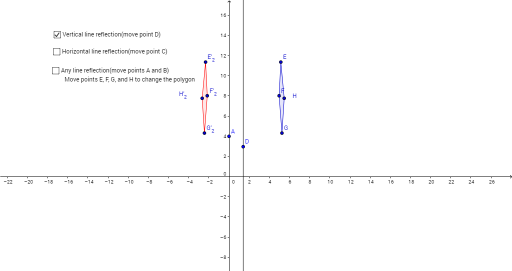
① This interactive activity demonstrates the reflection (mirror) transformation of plane figures about a line, visually showing the position, orientation, and area relationships before and after reflection. ② Core mathematical concepts include reflection symmetry, axial symmetry, congruent figures, area conservation, and intersection properties of the reflecting line with polygon edges; it also extends to probability and geometric mean (e.g., probability of random points falling in reflected regions). ③ Construction highlights: Uses GeoGebra commands Line (to define the mirror axis), OrthogonalLine (to draw perpendiculars), Polygon (to construct the original polygon), Mirror (to generate reflected images), and Point (to define key points); objects include original polygon poly1 with edges e,f,g,h, reflected polygon poly1' with corresponding edges, and multiple reflected copies (poly1'_1, etc.), with points E,F,G,H and their images E',F',G',H' controlling dynamic changes. ④ Suitable for middle school geometry (basic symmetry concepts) and high school transformation and area calculations, as well as math lab or inquiry-based learning, helping students understand invariants and symmetry properties of reflection transformations.
GeoGebra Commands & Parameters
Line(A, B) → aLine(C, xAxis) → bOrthogonalLine(D, xAxis) → cPolygon(E, F, G, H) → poly1, e, f, g, hMirror(E, b) → E'Mirror(F, b) → F'Mirror(G, b) → G'Mirror(H, b) → H'Polygon(E', F', G', H') → poly1', e', f', g', h'Mirror(E, a) → E'_1Mirror(F, a) → F'_1Mirror(G, a) → G'_1Mirror(H, a) → H'_1Polygon(E'_1, F'_1, G'_1, H'_1) → poly1'_1, e'_1, f'_1, g'_1, h'_1Mirror(E, c) → E'_2Mirror(F, c) → F'_2Mirror(G, c) → G'_2Mirror(H, c) → H'_2Polygon(E'_2, F'_2, G'_2, H'_2) → poly1'_2, e'_2, f'_2, g'_2, h'_2OrthogonalLine(G, a) → kOrthogonalLine(H, a) → lOrthogonalLine(E, a) → mOrthogonalLine(F, a) → nPoint(k) → I