
Interactive Mixed Number Division Visualizer
Loading the math board and drawing, please wait…
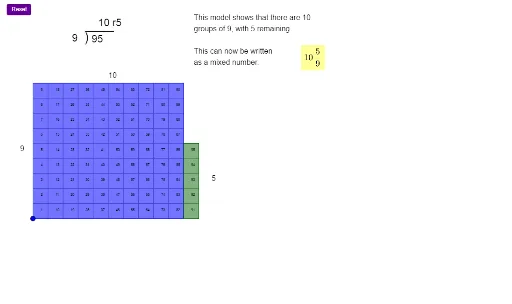
This example demonstrates how to divide mixed numbers (numbers consisting of a whole number and a fraction) through visual representation. Key mathematical concepts include: converting between mixed numbers and improper fractions, the division rule for fractions (multiply by the reciprocal), and the concepts of quotient and remainder. Construction details: Uses Mod and GCD commands to calculate remainders and greatest common divisors; uses Sequence and Flatten to generate arrays for quotients and remainders; uses Polygon to create visual block arrays showing the division process; uses Textfield to create interactive input boxes for dividend and divisor, dynamically displaying quotient, remainder and error messages. Suitable for upper elementary to middle school students learning fraction division, or as a visual teaching aid for teachers explaining mixed number division.
GeoGebra Commands & Parameters
Mod(dividend, divisor) → remainderFlatten(Sequence[Sequence[A + (i, j), j, 0, divisor - 1], i, 0, quotient + 1]) → arrayforunitsSequence(Polygon[Element[arrayforunits, i], Element[arrayforunits, i] + (1, 0), 4], i, 1, counter) → list2Flatten(Sequence[Sequence[A + (i, j), j, 0, divisor], i, 0, quotient + 1]) → arrayforappearancePolygon(A, A + (quotient, 0), A + (quotient, divisor), A + (0, divisor)) → productpoly, a, f, g, hText(divisor, Midpoint[h] + (adjusthorizontal, 0)) → text1Text(quotient, Midpoint[g] + (0, adjustvertical)) → text2Polygon(A + (quotient, 0), A + (quotient + 1, 0), A + (quotient + 1, remainder), A + (quotient, remainder)) → remainderpoly, i, j, k, lText(remainder, Midpoint[j] - (adjusthorizontal, 0)) → text3Textfield(dividendtext) → dividendinputTextfield(divisortext) → divisorinputSequence(Text[i, Centroid[Element[list2, i]]], i, 1, dividend) → list1GCD(divisor, remainder) → GCDivisor
AI Drawing Prompt Reference
Create an interactive visualizer for mixed number division with two input text boxes for the dividend and divisor. Calculate and display the quotient and remainder based on the two input numbers. Use colored block arrays to visually demonstrate the division process: first show complete rows of blocks for the quotient, with each row containing the divisor number of blocks, then show partial blocks for the remainder. Label the divisor, quotient, and remainder values at corresponding positions. The entire graphic updates dynamically with input, suitable for teaching fraction division steps.
The prompt above was compiled from the original drawing commands and is for reference only.