
Interactive GeoGebra Example: Exploring Segment Addition Postulate
Loading the math board and drawing, please wait…
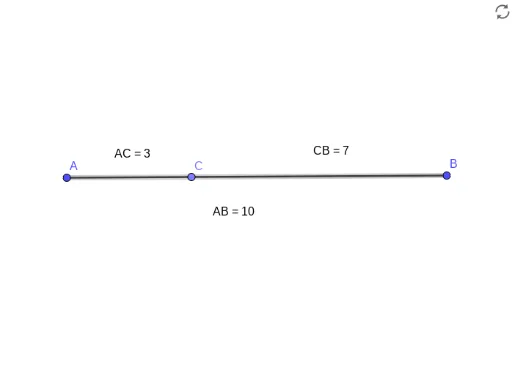
This GeoGebra example dynamically demonstrates the Segment Addition Postulate, showing that when point C lies on segment AB, the relationship AC + CB = AB holds. Key mathematical concepts covered: the segment addition postulate for collinear points, the meaning of distance between two points, and the relationship between point order and segment relationships. Construction details: Using the Segment command to draw segments AB and auxiliary lines, the Point command to create draggable point C on the segment, the Distance command to calculate and display lengths AC, CB, and AB, and the Text command to dynamically show length values. Suitable for middle school mathematics teaching (especially introductory geometry in grade 7), helping students understand basic segment concepts, distance formulas, and the intuitive meaning of geometric postulates.
GeoGebra Commands & Parameters
Segment(A, B) → fPoint(f) → CDistance(A, C) → distanceACDistance(C, B) → distanceCBDistance(A, B) → distanceAB
AI Drawing Prompt Reference
Draw a horizontal segment with endpoints labeled as left and right. Place a draggable point on the segment between the two endpoints. Measure and display the distances from this point to the left endpoint, to the right endpoint, and between the two endpoints. Use text labels near the figure to dynamically show these three distance values, visually demonstrating that the sum of the two partial distances equals the total segment length. The figure should clearly show how moving the point changes the distance values.
The prompt above was compiled from the original drawing commands and is for reference only.