
Angle Bisector and Angle Addition Postulate
Loading the math board and drawing, please wait…
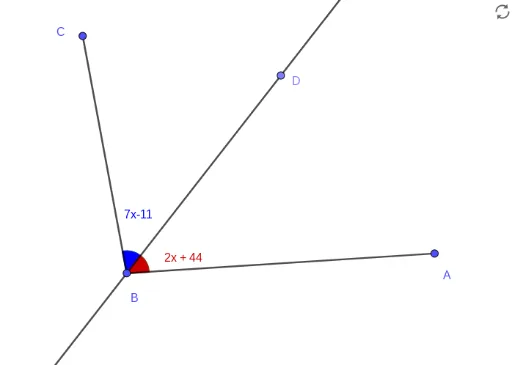
This GeoGebra example demonstrates the construction of an angle bisector and its relationship with the Angle Addition Postulate. The construction begins by creating angle ABC with rays BC and BA, then uses the AngularBisector command to draw ray BD, which divides the angle into two equal parts. The example further illustrates the Angle Addition Postulate (∠ABC = ∠ABD + �∠DBC) by placing a point D inside the angle and connecting it appropriately. The construction employs GeoGebra commands including Angle (to create angle objects), Segment (to draw line segments AB, BC, and BD), AngularBisector (to generate the angle bisector), and Point (to place point D inside the angle). Key objects include vertices A, B, C, angles α, β, γ, and bisectors f, g, h. This example is ideal for middle school students (grades 7-9) learning fundamental geometry concepts, helping them understand the definition and properties of angle bisectors, as well as providing visual verification of the Angle Addition Postulate.
GeoGebra Commands & Parameters
Angle(A, B, C) → αSegment(A, B) → fSegment(B, C) → gAngularBisector(C, B, A) → hPoint(h) → DAngle(D, B, C) → βAngle(A, B, D) → γ
AI Drawing Prompt Reference
Draw a triangle ABC with vertices A, B, and C. First, draw line segments AB and BC. Then, draw the angle bisector BD of angle ABC, dividing it into two equal angles. Place a point D inside angle ABC and draw angles ABD and DBC.
The prompt above was compiled from the original drawing commands and is for reference only.