
Interactive Fraction Addition and Subtraction
Loading the math board and drawing, please wait…
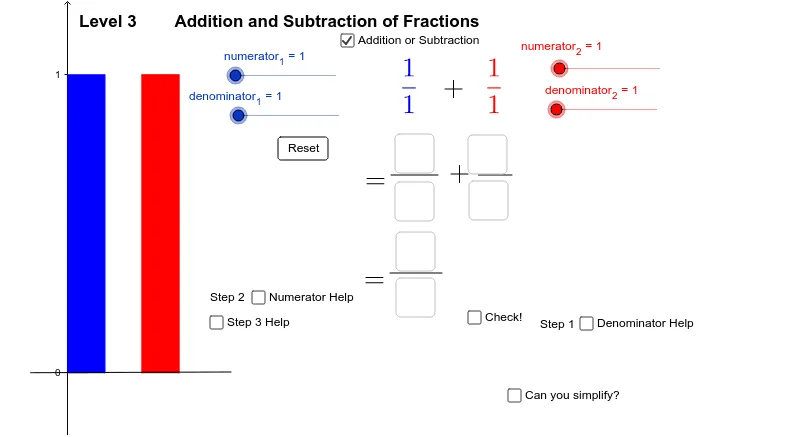
This example demonstrates the interactive process of adding and subtracting fractions, covering core math concepts like fraction operations, least common multiple (LCM), and fraction representation. It utilizes GeoGebra commands and objects such as Polygon, Intersect, Point, Textfield, Segment, LCM, FractionText, and TextToUnicode for construction. Suitable for middle school and above learners to visualize and understand fraction arithmetic.
GeoGebra Commands & Parameters
Polygon(C, D, B, A) → poly1, c_1, d_1, b_1, a_1Polygon(G, H, F, E) → poly2, g, h, f, eIntersect(xAxis, yAxis) → IPoint(xAxis) → JPolygon(I, J, 4) → poly3, i, j, k, l, K, LPoint(xAxis) → MPoint(xAxis) → NPolygon(M, N, 4) → poly4, m, n, p, q, O, PTextfield(num_1) → inputBox1Textfield(num_2) → inputBox2Textfield(den_1) → inputBox3Textfield(den_2) → inputBox4Segment(Q, R) → aSegment(T, S) → bTextfield(ans_1) → inputBox5Textfield(ans_2) → inputBox6Textfield(ans_3) → inputBox7Textfield(ans_4) → inputBox8Segment(U, V) → cSegment(W, Z) → dLCM(denominator_1, denominator_2) → oSegment(B_1, C_1) → tSegment(F_1, G_1) → f_1Segment(F_1, H_1) → g_1Segment(E_1, I_1) → e_1Segment(J_1, K_1) → h_1Textfield(ans_5) → inputBox9FractionText(numerator_1 / denominator_1 + numerator_2 / denominator_2) → ans_6FractionText(numerator_1 / denominator_1 - numerator_2 / denominator_2) → ans_7TextToUnicode(text14) → bb
AI Drawing Prompt Reference
Create an interactive fraction addition and subtraction diagram, including two rectangular areas to represent the denominators of the fractions, two input boxes for the numerators and denominators of the fractions, and two areas to display the addition and subtraction results of the fractions. First, draw two rectangular areas, then add the input boxes, followed by drawing line segments to represent the addition and subtraction of fractions, and finally display the result text boxes.
The prompt above was compiled from the original drawing commands and is for reference only.