
Converting Decimals to Fractions by Cina
Loading the math board and drawing, please wait…
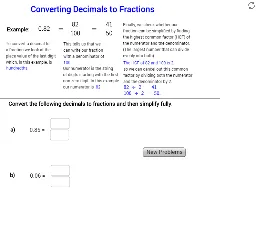
This example demonstrates how to convert decimals to fractions. Key mathematical concepts include fractions and division. Using GeoGebra commands such as RandomDiscrete, Random, If, GCD, etc., a dynamic conversion process is constructed. Suitable for middle school and above students to learn the method of converting decimals to fractions.
GeoGebra Commands & Parameters
RandomDiscrete({10, 100, 1000}, {1, 3, 2}) → Rawd_2Random(1, Rawd_2 - 1) → Rawn_2RandomDiscrete({10, 100, 1000}, {1, 3, 2}) → Rawd_1Random(1, Rawd_1 - 1) → Rawn_1RandomDiscrete({10, 100, 1000}, {1, 3, 2}) → XRawd_1Random(1, XRawd_1 - 1) → XRawn_1If(Mod[Rawn_1, 100] ≟ 0, Rawd_1 / 100, If[Mod[Rawn_1, 10] ≟ 0, Rawd_1 / 10, Rawd_1]) → d_1If(Mod[Rawn_1, 100] ≟ 0, Rawn_1 / 100, If[Mod[Rawn_1, 10] ≟ 0, Rawn_1 / 10, Rawn_1]) → n_1GCD(n_1, d_1) → HCF_1Textfield(Sd_1) → inputBox2Textfield(Sn_1) → inputBox1Intersect(xAxis, yAxis) → BLine(B, C) → aOrthogonalLine(A, a) → bPoint(b) → DOrthogonalLine(D, b) → cPoint(c) → ETextfield(SAn_1) → inputBox3Textfield(SAd_1) → inputBox4Point(c) → FPoint(c) → GFromBase(SAn_1, 10) → Simn_1FromBase(SAd_1, 10) → Simd_1If(Mod[XRawn_1, 100] ≟ 0, XRawd_1 / 100, If[Mod[XRawn_1, 10] ≟ 0, XRawd_1 / 10, XRawd_1]) → XdIf(Mod[XRawn_1, 100] ≟ 0, XRawn_1 / 100, If[Mod[XRawn_1, 10] ≟ 0, XRawn_1 / 10, XRawn_1]) → XnGCD(Xn, Xd) → XHCFIf(Mod[Rawn_2, 100] ≟ 0, Rawd_2 / 100, If[Mod[Rawn_2, 10] ≟ 0, Rawd_2 / 10, Rawd_2]) → d_2If(Mod[Rawn_2, 100] ≟ 0, Rawn_2 / 100, If[Mod[Rawn_2, 10] ≟ 0, Rawn_2 / 10, Rawn_2]) → n_2GCD(n_2, d_2) → HCF_2Textfield(Sd_2) → inputBox2_1Textfield(Sn_2) → inputBox1_1Textfield(SAn_2) → inputBox3_1Textfield(SAd_2) → inputBox4_1FromBase(SAn_2, 10) → Simn_2FromBase(SAd_2, 10) → Simd_2Mod(n_1, Simn_1) → Modn_1Mod(n_2, Simn_2) → Modn_2Mod(d_1, Simd_1) → Modd_1Mod(d_2, Simd_2) → Modd_2
AI Drawing Prompt Reference
Draw a dynamic process of converting fractions to decimals. First, generate three random numbers representing the denominator and numerator. Convert the numerator and denominator to their simplest form by checking remainders. Then, plot these numbers in a coordinate system, including lines, perpendicular lines, and points. Finally, display the converted fraction and decimal, and their relationships.
The prompt above was compiled from the original drawing commands and is for reference only.