
Interactive Exploration of Function Domain and Range
Loading the math board and drawing, please wait…
In collections
Apps for Formative Assessment Grade 10
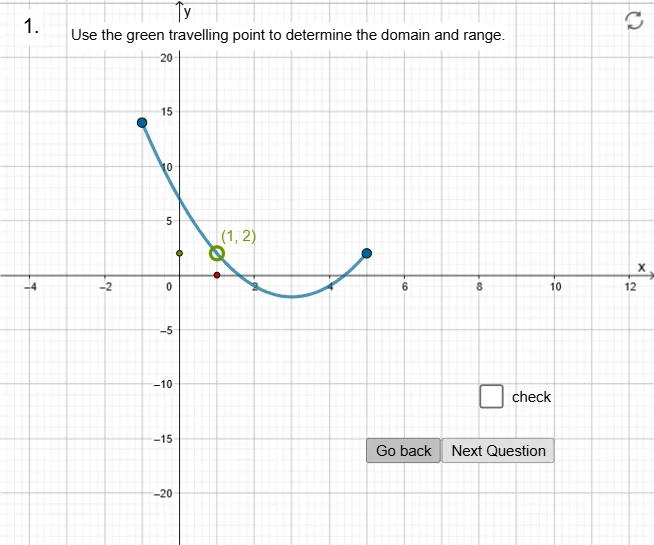
This GeoGebra example demonstrates the concepts of function domain and range through an interactive visualization. It uses a sequence of points and buttons to show how input values (domain) map to output values (range) on a coordinate plane. Core mathematical concepts include the definition of domain, range, and the mapping between them, with connections to frequency distribution and discrete data representation in probability and statistics. The construction employs commands such as Sequence, Element, and Point to generate points (f1 to f10), stores data in lists (L_1, L_2, L_3), and uses a button (button1) to toggle visibility, along with auxiliary objects (g1 to g13) to build a clear visual interface highlighting the extent of domain and range on the axes. This resource is suitable for middle and high school students learning functions, as well as for teachers demonstrating these concepts in class or for self-study.
GeoGebra Commands & Parameters
Sequence((n, 10 - n), n, 0, 4) → L_3Sequence((n, (3 * n) - 5), n, -2, 4) → L_1Sequence((n, (-n^(2)) + 5), n, -2, 4) → L_2Sequence((n, (3 * sin((n * pi / 2)))), n, 1, 8) → L_4Element(list1, question) → gPoint(g) → POINTSequence(y = n, n, -20, 25, 1) → l1
AI Drawing Prompt Reference
Create an interactive coordinate plane visualization showing the mapping between domain and range for several functions. Plot discrete points for a descending line, an ascending line, a downward parabola, and a sine wave, with points evenly spaced along the x-axis. Use distinct colors or styles for each point set. Highlight the extent of input and output values on the axes using dashed lines or shaded regions to emphasize domain and range intervals. Include a clickable button to toggle the visibility of the points, allowing observation of the mapping. Keep the layout clear for educational demonstration.
The prompt above was compiled from the original drawing commands and is for reference only.