
Interactive Exploration of a Cuboid’s Surface Area
Loading the math board and drawing, please wait…
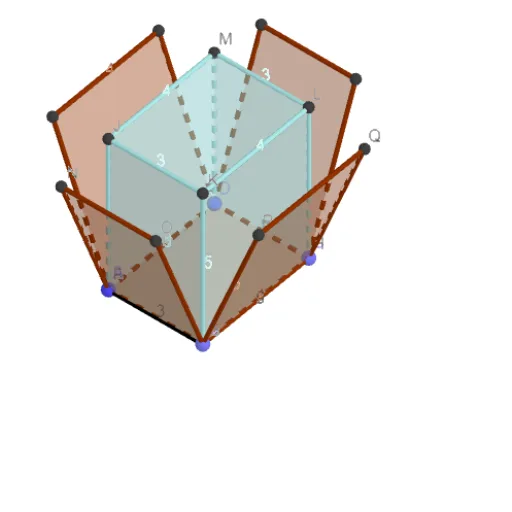
This GeoGebra example visualizes how the surface area of a cuboid is formed by combining the areas of its six faces, and it also links the 3D solid to its corresponding net (展开图). The key mathematics includes solid geometry, surface area computation, the face–edge relationships in a cuboid, and the correspondence between a cuboid and its planar unfolding. Construction-wise, the model uses Point, Segment, and Polygon to create the key vertices, edges, and face boundaries, then applies Prism to generate the cuboid. Net is used to display the unfolding layout, and PointIn helps place/identify points within the net region. The scene includes dimensional parameters such as length, breadth, and height, along with face objects (e.g., faceBEJK, faceBCLK, faceCDML, faceDEJM, faceJKLM) and edge objects (e.g., edgeEJ, edgeBK, edgeCL, edgeDM, etc.), enabling learners to directly see how each rectangular face contributes to the total surface area. Suitable for middle school to high school geometry lessons and for classroom demonstrations or guided explorations focused on formulas and geometric modeling.
GeoGebra Commands & Parameters
Point(Circle[A, length]) → BSegment(A, B) → fPoint(Circle[B, breadth]) → CSegment(B, C) → gPoint(Circle[C, length]) → DSegment(C, D) → hPoint(Circle[D, breadth]) → ESegment(D, E) → iPolygon(E, B, C, D) → q1, e, b, c, dPrism(q1, height) → j, J, edgeEJ, edgeBK, edgeCL, edgeDM, edgeJK, edgeKL, edgeLM, edgeJM, K, L, M, faceBEJK, faceBCLK, faceCDML, faceDEJM, faceJKLMNet(j, net) → k, F, S, T, U, V, W, faceFGHI, faceFGON, faceGHQP, faceHISR, faceFITU, G, faceNOVW, edgeFG, edgeGH, edgeHI, edgeFI, edgeFN, edgeNO, edgeGO, edgeGP, edgePQ, H, edgeHQ, edgeHR, edgeRS, edgeIS, edgeIT, edgeTU, edgeFU, edgeOV, edgeVW, edgeNW, I, N, O, P, Q, RPointIn(faceGHQP) → PointfaceGHQP_{1}PointIn(faceJKLM) → PointfaceJKLM_{1}PointIn(faceJKLM) → PointfaceJKLMPointIn(faceFGON) → PointfaceFGON_{1}PointIn(faceFGON) → PointfaceFGONPointIn(faceGHQP) → PointfaceGHQP
AI Drawing Prompt Reference
Create a 3D cuboid with its planar net shown in the same scene. First, in the plane, draw a rectangle that serves as the central face by fixing four corner points and the given length and breadth dimensions. Set a separate height parameter for the cuboid’s vertical extent. Use the same dimensions to form the cuboid from six rectangular faces, with shared edges between adjacent faces and opposite faces matched as pairs. Then unfold the cuboid into a net layout on the plane so each rectangular face in the net corresponds to a face of the 3D solid. Finally, place a few points inside selected net faces to emphasize the mapped regions.
The prompt above was compiled from the original drawing commands and is for reference only.