
Interactive Example of General Quadrilateral with Sine, Arithmetic Distribution
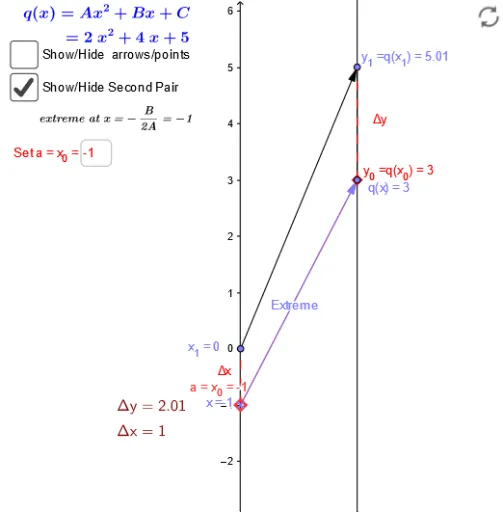
Loading the math board and drawing, please wait…
This example demonstrates a dynamic geometry construction involving a general quadrilateral, sine functions, arithmetic distributions, and ratio concepts. The core mathematical ideas include properties of quadrilaterals, the application of sine in geometric contexts, arithmetic sequences or distributions, and ratios between segments or areas. Construction highlights: using GeoGebra commands such as Vector, Textfield, Segment, and Sequence to create objects including points A, B, C, D, vectors u and v, segments a, c, d, e, and interactive elements like button1 and inputBox1 for dynamic adjustments. Suitable for high school or college students exploring integrated geometry, trigonometry, and sequences, as well as for investigating relationships between sine and ratios in quadrilaterals.
GeoGebra Commands & Parameters
Vector(A_1, B_1) → uTextfield(f) → inputBox1Vector(x_1, y_1) → vSegment(q_x, F) → cSegment(E, F) → dSegment(A_1, x_1) → eSegment(B_1, y_1) → gSegment(B_1, y_1) → h_1Sequence(Vector[(0, i), (2, f(i))], i, -3, 3, 1) → list1Sequence((i, f(i)), i, -3, 3, 1) → list2Vector(G, H) → ExtremeTextfield(C) → InputBox1Textfield(A) → InputBox2Textfield(B) → InputBox3Textfield(xx_0) → InputBox4
AI Drawing Prompt Reference
Draw a quadrilateral ABCD with points A, B, C, and D that can be moved. Use vector u to represent AB and vector v to represent CD. Draw segments AC, BD, AD, and BC. Add an input box inputBox1 to adjust the length of the segments. Use the sine function to plot a series of points forming a sine wave. Add a button button1 to dynamically adjust the figure.
The prompt above was compiled from the original drawing commands and is for reference only.