
Geometric Generalization of Quadrilateral Sequences
Loading the math board and drawing, please wait…
In collections
geometriadinamica.es
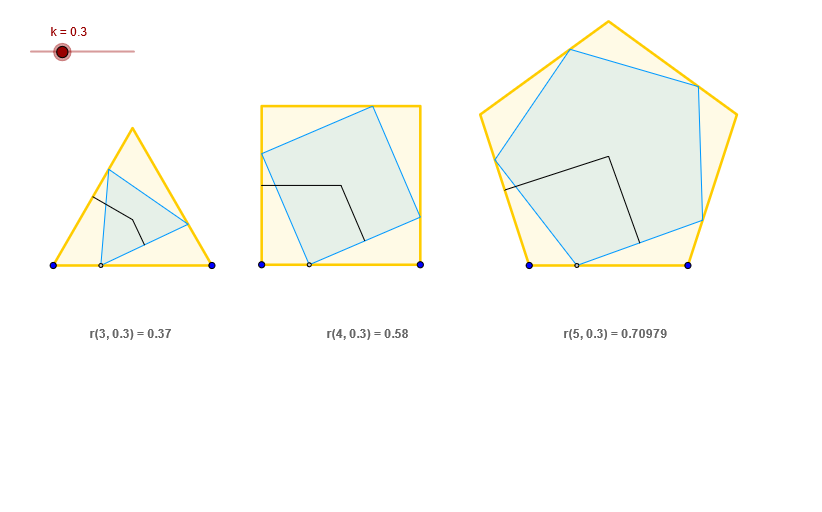
This example demonstrates how to generalize quadrilateral sequences through geometric construction. Using quadrilaterals as base figures, it employs GeoGebra commands including Polygon for constructing polygon frameworks, Midpoint for finding edge midpoints, Segment for creating internal structures, Vector for handling vector relationships, OrthogonalLine and Intersect for calculating intersection points. The entire process showcases the integration of sequences, geometric distribution, and vector transformations, presenting the evolution from special quadrilaterals to generalized geometric structures. Suitable for upper secondary school and early undergraduate students exploring geometric representation of sequences, geometric transformations, and mathematical generalization concepts.
GeoGebra Commands & Parameters
Vector(S, T) → w_1Polygon(S, T, 5) → poly3, t, a_1, d_1, e_1, i_1, U, V, WMidpoint(i_1) → L_1Vector(U, V) → j_1Vector(T, U) → z_1Vector(W, S) → v_1Vector(V, W) → u_1Polygon(B, C, 4) → poly1, c, d, e, f, D, EMidpoint(f) → K_1Polygon(K, L, 3) → poly5, l, m, n, MMidpoint(n) → J_1Vector(B, C) → vVector(D, E) → hVector(C, D) → wVector(E, B) → uPolygon(F, G, H, I) → poly2, f_1, g_1, h_1, iVector(K, L) → zVector(L, M) → pVector(M, K) → qPolygon(O, P, N) → poly6, n_1, o, p_1Segment(Q, K) → c_1Segment(Q, J_1) → b_1OrthogonalLine(Q, n_1) → aIntersect(n_1, a) → ASegment(Q, A) → bOrthogonalLine(J, g_1) → jIntersect(g_1, j) → RSegment(J, R) → sPolygon(A_1, B_1, C_1, D_1, Z) → poly4, a_2, b_2, c_2, d_2, z_2OrthogonalLine(E_1, b_2) → k_1Intersect(b_2, k_1) → F_1Segment(E_1, F_1) → m_1Segment(J, K_1) → rSegment(E_1, L_1) → l_1
AI Drawing Prompt Reference
Draw a geometric sequence composed of multiple quadrilaterals. Start by constructing a pentagon, then find the midpoints of its sides, and use vector relationships to create internal structures. Next, construct another quadrilateral and find the midpoints of its sides. Continue using vectors and intersections to calculate new quadrilaterals, ultimately forming a complex geometric structure composed of multiple quadrilaterals.
The prompt above was compiled from the original drawing commands and is for reference only.