
Interactive Cylinder Net and Dimensions Explorer
Loading the math board and drawing, please wait…
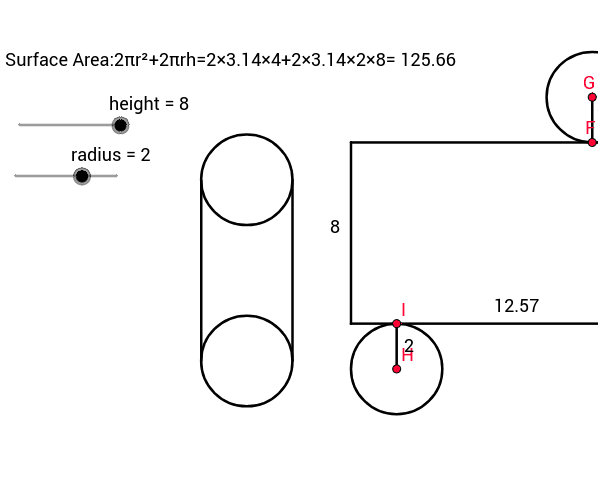
This GeoGebra example dynamically demonstrates the net (unfolded surface) of a cylinder and how changing its dimensions affects its surface area and volume. Core mathematical concepts include the geometry of cylinders, specifically the relationship between radius, height, lateral area, total surface area, and volume. The construction utilizes key GeoGebra commands such as Point, Circle, Segment, Intersect, OrthogonalLine, and Line to draw the circular bases and the rectangular lateral net. Variables like radius and height are linked to calculated values of volume and surface area sa via text objects. It is designed for secondary school geometry classes, offering an interactive way for students to visualize 3D solids and understand the geometric principles behind cylinder calculations.
GeoGebra Commands & Parameters
Point(xAxis) → ACircle(A, radius) → cSegment(B, C) → aCircle(E, radius) → dSegment(C, E) → bSegment(E, D) → eSegment(D, B) → fIntersect(d, b, 1) → FCircle(F, radius) → gOrthogonalLine(F, b) → hIntersect(g, h, 2) → GCircle(G, radius) → kIntersect(c, xAxis, 2) → HCircle(H, radius) → pIntersect(p, f, 1) → IPoint(yAxis) → JCircle(J, radius) → qCircle(K, radius) → rPoint(r) → LPoint(q) → MSegment(L, M) → iLine(K, L) → jLine(J, M) → lIntersect(r, j, 2) → NIntersect(q, l, 2) → OSegment(N, O) → mSegment(I, H) → nSegment(G, F) → t
AI Drawing Prompt Reference
Draw a cylinder net consisting of two congruent circles for the bases and a rectangle for the lateral surface; the rectangle’s width equals the circle circumference (2πr) and its height equals the cylinder height h. Place the circles on opposite sides of the rectangle so their centers align with the midpoints of the rectangle’s long edges. Add adjustable sliders for radius r and height h, and display the volume V = πr²h and total surface area S = 2πr(r+h) dynamically. Construct by first drawing a base circle, then using the radius to set the rectangle width via the circumference, drawing the rectangle to the given height, and finally positioning the second base circle at the opposite end, all linked to the parameters.
The prompt above was compiled from the original drawing commands and is for reference only.