
Integral and Riemann Sum Construction
Loading the math board and drawing, please wait…
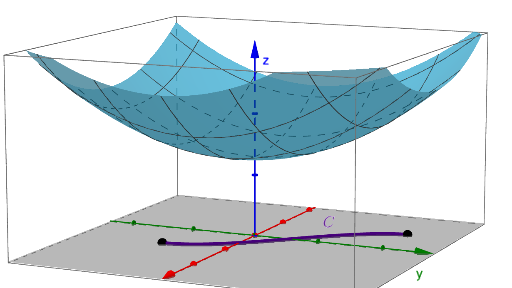
This example demonstrates the geometric construction of integrals and Riemann sums. Key mathematical concepts include integration, Riemann sums, function graphs, and area calculation. Construction involves using GeoGebra commands like CurveCartesian, Sequence, Textfield to build function curves, partition intervals, calculate heights, and draw Riemann sum rectangles. Suitable for high school students learning calculus fundamentals or for math teaching demonstrations.
GeoGebra Commands & Parameters
CurveCartesian(mx(i), my(i), i, ax, ay) → dSequence(d(ax + (k * (ay - ax) / n)), k, 0, n, 1) → points2dSequence(d(ax + (k * (ay - ax) / n)) + (0, 0, 0), k, 0, n, 1) → pts3dSequence((x(Element[points2d, k]), y(Element[points2d, k]), f(x(Element[points2d, k]), y(Element[points2d, k]))), k, 1, n + 1, 1) → pointsurfaceTextfield(f) → InputBox1Textfield(mx) → InputBox2Textfield(my) → InputBox3Textfield(ax) → InputBox4Textfield(ay) → InputBox5Sequence(Segment[Element[points2d, k], Element[points2d, k + 1]], k, 1, n) → partition2dSequence((f(d(ax + ((k - 1 + R) * (ay - ax) / n))) * Element[partition2d, k]), k, 1, n) → heightsurface, {}If(Final ≟ Initial ∧ n ≟ 2, Element[heightsurface, 2], Polygon[(1, 0), (1, 0)]) → condition1Textfield(n) → InputBox6Sequence(d(ax + ((k - 1 + R) * (ay - ax) / n)) + (0, 0, 0), k, 1, n) → list1Sequence((x(Element[list1, i]), y(Element[list1, i]), f(Element[list1, i])), i, 1, n) → list2Sequence((x(Element[pts3d, i]), y(Element[pts3d, i]), z(Element[list2, i])), i, 1, n) → list3Sequence((x(Element[pts3d, i + 1]), y(Element[pts3d, i + 1]), z(Element[list2, i])), i, 1, n) → list4Sequence(Polygon[Element[pts3d, k], Element[pts3d, k + 1], Element[list4, k], Element[list3, k]], k, 1, n) → rectangles
AI Drawing Prompt Reference
Draw a function's integral and Riemann sum. First, plot the function curve. Then, divide the interval into n subintervals, calculate the height of each subinterval, and draw the corresponding rectangles. Input the function expression f(x), the transformation mx(x) and my(y) for x and y, the start point ax and end point ay of the interval, and the number of subintervals n.
The prompt above was compiled from the original drawing commands and is for reference only.