
Integer Percentage Calculation
Loading the math board and drawing, please wait…
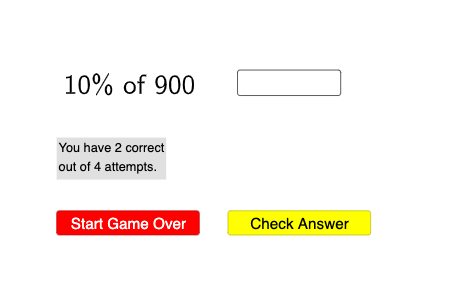
This example demonstrates how to calculate and visualize integer percentages using GeoGebra. It involves core math concepts like percentages, arithmetic operations, and sequence generation/sorting. Key GeoGebra commands used include Sequence, Sort, RandomElement, IndexOf, Element, Textfield, Numerator, and Denominator to create random integer/fraction sequences and display results. Suitable for middle school and above mathematics education, focusing on percentage calculations and sequence applications.
GeoGebra Commands & Parameters
Sequence(u / 10, u, 1, 9) → tenths, {0.1, 0.2, 0.3, 0.4, 0.5, 0.6, 0.7, 0.8, 0.9}Sort(Join[{fourths, tenths, thirds, eights}]) → l1Sequence(FractionText[Element[l1, u]], u, 1, Length[l1]) → l2, {" \frac{ 1 }{ 10 } ", " \frac{ 1 }{ 8 } ", " \frac{ 1 }{ 5 } ", " \frac{ 1 }{ 4 } ", " \frac{ 3 }{ 10 } ", " \frac{ 1 }{ 3 } ", " \frac{ 3 }{ 8 } ", " \frac{ 2 }{ 5 } ", " \frac{ 1 }{ 2 } ", " \frac{ 3 }{ 5 } ", " \frac{ 5 }{ 8 } ", " \frac{ 2 }{ 3 } ", " \frac{ 7 }{ 10 } ", " \frac{ 3 }{ 4 } ", " \frac{ 4 }{ 5 } ", " \frac{ 7 }{ 8 } ", " \frac{ 9 }{ 10 } "}RandomElement(l2) → text1, " \frac{ 1 }{ 10 } "Sort(Flatten[Sequence[Sequence[Sequence[((2^(a) * 5^(b)) * 3^(c)), a, 1, 3], b, 1, 2], c, 1, 2]]) → l3RandomElement(l3) → aIndexOf(text1, l2) → bElement(l1, b) → cTextfield(ans) → InputBox1Numerator(c) → eDenominator(c) → f
AI Drawing Prompt Reference
Create a single visual for an integer percentage calculation using fraction display. First prepare a sorted set of fraction values corresponding to one-digit decimals from 0.1 through 0.9, shown as fraction text. Randomly select one fraction from this set and display its fraction form. Then obtain a new target fraction by linking an additional randomly chosen parameter from a precomputed list of fraction results involving products of powers, consistent with the index of the selected fraction. Finally, show the numerator and denominator of the resulting target fraction as separate labeled values, and provide an input field/answer box for the computed result.
The prompt above was compiled from the original drawing commands and is for reference only.