
Integer Multiplication Visualization by mathspace
Loading the math board and drawing, please wait…
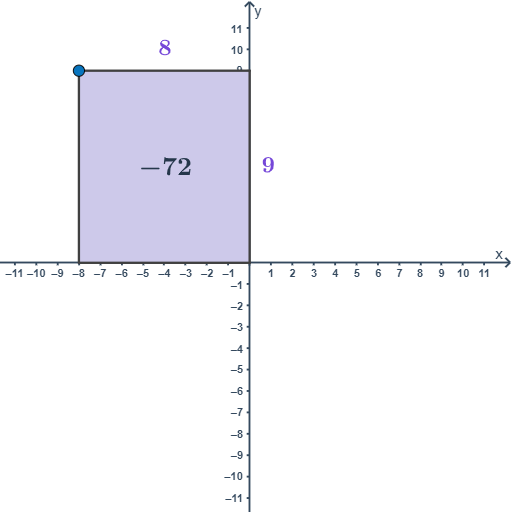
This example demonstrates the geometric interpretation of integer multiplication through dynamic constructions, transforming abstract operations into visual representations like areas or shapes. Key math concepts include integer operations, geometric constructions, symmetry, and coordinate geometry. GeoGebra commands and objects used are OrthogonalLine, Intersect, Polygon, Midpoint, CircleArc, If, Corner. Suitable for middle school and above students to understand the geometric basis of multiplication and enhance spatial reasoning.
GeoGebra Commands & Parameters
OrthogonalLine(C, yAxis) → bIntersect(b, yAxis) → DOrthogonalLine(C, xAxis) → aIntersect(a, xAxis) → BIntersect(xAxis, yAxis) → APolygon(A, B, C, D) → poligon1, a_1, b_1, c, dMidpoint(A, C) → ECircleArc(E, A, D) → eCircleArc(E, D, A) → fPolygon(A, B, C, D) → poly1, a_2, b_2, c_1, d_1Midpoint(a_2) → xplusMidpoint(b_2) → yminusMidpoint(c_1) → xminusMidpoint(d_1) → yplusIf(x(C) ≥ 0 ∧ h ≥ 0, xminus, If[x(C) < 0 ∧ h ≥ 0, xplus, If[x(C) ≥ 0 ∧ h < 0, xplus, If[x(C) < 0 ∧ h < 0, xminus]]]) → GIf(x(C) ≥ 0 ∧ h ≥ 0, yminus, If[x(C) < 0 ∧ h ≥ 0, yplus, If[x(C) ≥ 0 ∧ h < 0, yminus, If[x(C) < 0 ∧ h < 0, yplus]]]) → HCorner(text4, 1) → textc1Corner(text4, 2) → textc2Midpoint(textc1, textc2) → c12Corner(text4, 4) → textc4Midpoint(textc1, textc4) → c13Corner(text4, 3) → textc3
AI Drawing Prompt Reference
Create a dynamic geometric visualization of integer multiplication, showing multiplication as visual representations like areas or shapes. Start by drawing coordinate axes and their intersection point, then construct a quadrilateral, find the midpoints of its diagonals, draw arcs, and finally adjust the display based on the sign rules of integer multiplication to reflect symmetry and geometric construction.
The prompt above was compiled from the original drawing commands and is for reference only.