
Integer Addition Test: Geometric Construction via Vectors and Segments
Loading the math board and drawing, please wait…
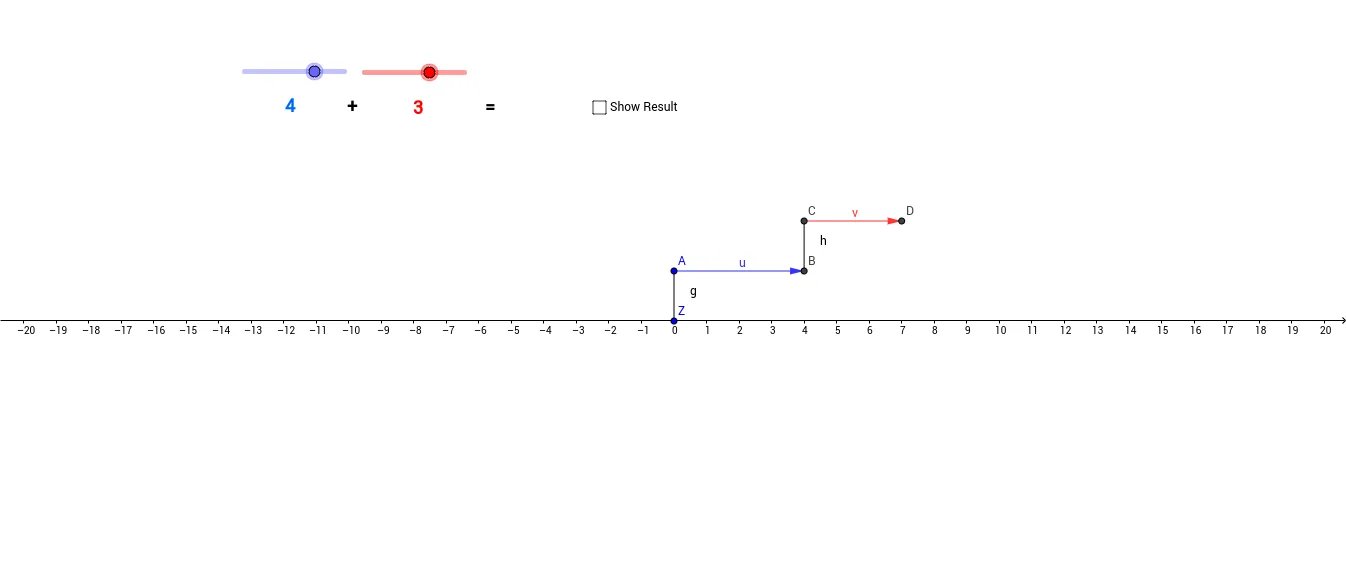
This GeoGebra applet demonstrates integer addition by mapping the “sum of integer steps” to a geometric result: vector translation and the corresponding segment outcomes. It helps learners see how arithmetic addition can be represented and verified through geometry. The main mathematical ideas include vector representation of moves, the geometric meaning of vector addition, and using coordinate differences to interpret linear relationships (and related notions such as difference/slope for checking consistency). Construction highlights from the provided summary: the applet relies on the GeoGebra commands Vector and Segment, creating multiple vector and segment objects (e.g., a, b, A, B, u, v, C, D, R, Z, g, h, i, r, c) to represent addends, results, and connecting lines, while text1–text5 provide labels for the integer-step/addition correspondence. Suitable for middle school through early university, especially for teaching vector geometry, modeling arithmetic with geometry, and using interactive verification in class or lab.
GeoGebra Commands & Parameters
Vector(A, B) → uVector(C, D) → vSegment(Z, A) → gSegment(B, C) → hSegment(D, R) → i
AI Drawing Prompt Reference
Create a geometric demonstration of vector addition, showing the process of adding two vectors. First, draw two vectors starting from point Z to point A and from point B to point C, connecting these points with line segments to form paths. Then, draw another vector from point D to point R and connect related points with line segments. Use these graphical elements to visually demonstrate the geometric meaning and result of vector addition.
The prompt above was compiled from the original drawing commands and is for reference only.