
Integer Addition Demonstration
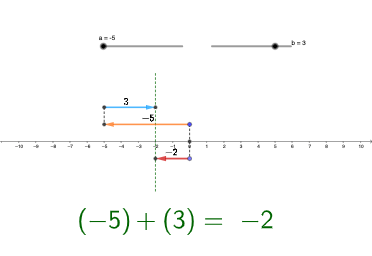
Loading the math board and drawing, please wait…
This example demonstrates the geometric representation of integer addition; involves core math concepts like integer operations, number line, geometric figures (sphere, inequalities, ellipse, ratios, LCM and GCD); constructed using commands/objects like Random, Intersect, Vector, Segment, Point, Midpoint in GeoGebra; suitable for middle school and above learners to visualize abstract mathematical concepts.
GeoGebra Commands & Parameters
Random(-10, 10) → b_{1}Random(10, 10) → a_{1}Intersect(xAxis, yAxis) → AVector(C, B) → uSegment(C, A) → fVector(D, E) → vPoint(yAxis) → FVector(F, G) → wVector(D, E) → cVector(C, B) → dSegment(H, I) → gSegment(D, B) → hMidpoint(E, D) → LMidpoint(B, C) → MMidpoint(G, F) → NVector(F, G) → eSegment(A, F) → i
AI Drawing Prompt Reference
Draw a number line starting from the origin, and draw a vector u to the right, and a vector v upwards from the origin. Then draw a line segment f from the origin to point F, and draw a vector w from point F. Next, draw a line segment h from point D to point B, and line segments c from point E to point D, and d from point B to point C. Finally, draw a line segment i from point A to point F, and the midpoint N of point F.
The prompt above was compiled from the original drawing commands and is for reference only.